Cursor vs GitHub Copilot vs Claude: What Each Tool Actually Does
Cursor, Copilot, and Claude aren't competing for the same job. Here's what each does best, where each fails, and the combo most serious developers use in 2026.

This article may contain affiliate links. See our Disclaimer for details.
The debate online is always framed the same way: Cursor vs GitHub Copilot. Which AI coding tool should you use? Which is winning? Pick one.
The framing misses something fundamental — and if you don't catch it, you'll spend money on the wrong tool for the wrong reason, or worse, rule out something genuinely useful because you were comparing it to the wrong thing.
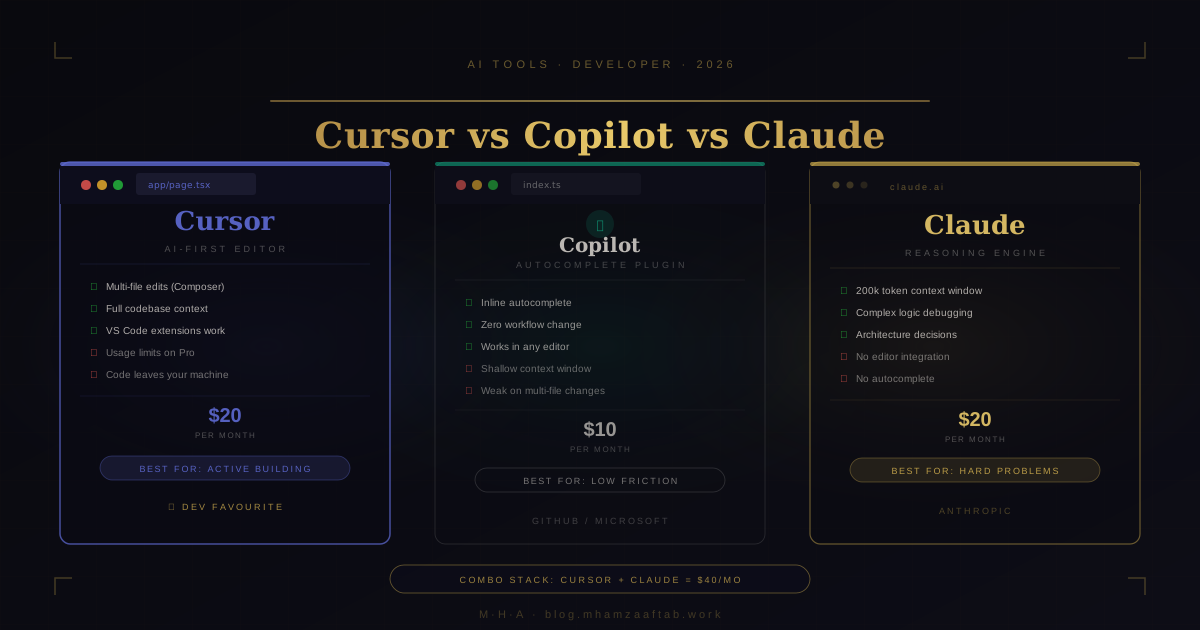
GitHub Copilot, Cursor, and Claude are not three versions of the same product. They don't occupy the same category. Comparing them is roughly like asking whether you should use a hammer, a workbench, or an architect's drawing — the answer depends on what you're trying to build, and for most serious projects, you probably need more than one.
Here's the actual breakdown: what each tool is, what it's good at, where it falls short, and what combination most experienced developers are running in 2026.
These Are Not Three Options on the Same Shelf
Before you compare pricing or model quality, you need to understand which category each tool belongs to:
GitHub Copilot is an autocomplete plugin. It sits inside your existing editor — VS Code, JetBrains, Neovim — and suggests code as you type. It doesn't change your workflow; it adds a layer on top of it. You type, it predicts, you press Tab or ignore it.
Cursor is an AI-first code editor. It's a fork of VS Code, so your extensions and keybindings carry over, but the AI is woven into the fabric of the editor rather than bolted on as a plugin. It can read entire directories, understand your project structure, and make multi-file changes from a single instruction. It's not completing code inside your editor — it is the editor.
Claude is a reasoning model. It's not an editor plugin at all. You bring code to Claude — paste it into Claude.ai or call the API — and Claude reasons about it. The interaction is conversational, not inline. You describe a problem, paste the relevant code, and Claude works through it.
This distinction matters because the real question isn't "which autocomplete should I use?" It's "what kind of help do I need, and at which stage of my work?"
GitHub Copilot — Fast, Invisible, Shallow
If you've been writing code for a while, you know what autocomplete fatigue looks like — the tool that generates ten lines of confident-looking code that are 80% right but wrong in the ways that matter. Copilot is better than its critics give it credit for, but it also has a ceiling that's lower than the marketing suggests.
What It Does Well
Copilot shines on boilerplate. If you're writing a REST endpoint that looks like every REST endpoint you've ever written, Copilot will complete the entire function body after you type the signature. Same with test setup code, utility functions, CSS media queries, and configuration files. For this category of work — repetitive, pattern-matching code you've written a hundred times — it actually reduces keystrokes.
The Tab-to-accept flow is the best UX decision in AI coding tools. There's no mode switch, no context window to manage, no prompt to compose. You code; it suggests; you accept or keep typing. Zero friction.
Individual plan is $10/month. There's also a usable free tier: 2,000 completions per month and 50 chat messages — not a stripped-down trial designed to frustrate you into upgrading.
Where It Falls Short
The context window is shallow. Copilot sees the file you're currently in, some recently opened files, and limited project-wide context. For a function that depends on types defined across four files, a service referencing a schema in a different module, or any code that requires understanding how the application fits together — Copilot guesses. Sometimes the guess is right. Sometimes it hallucinates an API method that doesn't exist, or generates code that compiles but breaks at runtime because it didn't understand a constraint in the data model.
Multi-file edits are improving but still fragile. The Chat sidebar helps, but it's a different interaction model from inline completion, and context doesn't carry cleanly between the two.
Niche APIs and newer libraries are a recurring problem. If you're using Hono, Drizzle ORM, or Next.js 16 features that are past Copilot's training cutoff, it will confidently generate outdated patterns. You still need to know enough to spot the mistake.
Who Should Use Copilot
Developers who want AI assistance without changing their workflow. If you've been in VS Code for five years and your muscle memory is tied to it, Copilot adds value at the margin without requiring you to relearn anything. It's also the right call for teams where standardizing on a single editor is impractical, or where code privacy requirements make tools that process code on remote servers a compliance concern (though Copilot Enterprise has data isolation options worth examining).
Copilot is a floor, not a ceiling. That's not a dismissal — a reliable floor is useful.
Cursor — The AI-First Editor
Cursor is what happens when you build an editor for AI from the start rather than adding AI to an editor designed in 2015. The difference is visible immediately.
How It's Different From Adding Copilot to VS Code
Because Cursor is a VS Code fork, you keep your extensions, themes, and keybindings. The switch is genuinely low-friction on day one. What you gain is an AI layer that understands your project as a system rather than as the single file you have open.
Two features drive most of the value:
Agent mode (formerly Composer): You describe what you want in natural language and Cursor makes changes across multiple files simultaneously. "Refactor the authentication flow to use the new session model, update all affected route handlers, and add corresponding tests" — it executes across the codebase rather than one file at a time. Not perfectly, and never without review, but the mechanical work contracts sharply.
@ context mentions: You can pull specific files, folders, documentation URLs, or web pages into the conversation context. When you're building a feature, you can tell Cursor "here's the API spec, here's the existing implementation, here's our test pattern — build the new endpoint to match." The model sees all of it.
Strengths
Greenfield projects. When you're building something from scratch and the bottleneck is execution speed, Cursor is the fastest path from decision to working code I've found. You can scaffold a full feature — API routes, database schema, service layer, TypeScript types — in a single Agent session that would take 90 minutes to write manually.
Large refactors. Renaming a data model referenced in 40 files. Migrating an auth pattern across a codebase. Switching from one ORM to another. Tasks that would take a day of careful find-and-replace become a supervised session rather than a manual slog.
Context awareness. Giving the model your full project context changes the quality of suggestions. Cursor doesn't have to guess what your User type looks like — it reads it.
Weaknesses
Usage limits hit harder than the pricing page suggests. Pro is $20/month for 500 fast requests using premium models (Claude 3.5 Sonnet, GPT-4o, etc.). If you're writing code all day, you'll exhaust those 500 requests inside two weeks. Once throttled to the slower model, the experience degrades noticeably. Heavy users report hitting the ceiling within 3–4 days of serious work. Cursor Business at $40/seat/month raises the limit but doesn't eliminate it.
Privacy. Your code goes to Cursor's servers, then to the model provider. There's a privacy mode available, but code still leaves your machine. For anything involving proprietary algorithms, pre-public IP, or clients with strict data confidentiality requirements, read the data processing policy carefully before committing.
Over-reliance risk. Cursor is capable enough that it's easy to ship code you don't fully understand. Every Agent output needs review. The more you trust it without reading, the higher the probability that a subtle bug gets through because the model confidently generated the wrong thing.
Who Should Use Cursor
Developers actively building products. If you're writing net-new code most of your day — new features, new services, new products — Cursor returns its $20/month in the first week. The transition from VS Code is low-friction. The velocity difference on greenfield work is real.
If you're maintaining legacy code with minimal new development, the ROI is lower. You still benefit from context-heavy refactors, but the autocomplete advantage shrinks on established codebases where changes are small and surgical.
Claude — Not an Editor, a Thinking Partner
Most tool comparisons treat Claude as "another AI coding assistant" and benchmark it on autocomplete speed and editor integration. That's the wrong frame entirely.
Claude is a large language model with a 200,000-token context window and, in its recent versions, extended thinking capability — a mode where it works through multi-step reasoning before producing a response. You interact with it through a chat interface or the API, not through your editor. There's no autocomplete, no Tab to accept. You describe a problem, paste your code, and Claude reasons through it.
The reasoning depth is the point. It's the thing the other tools don't do.
What Claude Is Actually For
Debugging hard problems. When you've been staring at a race condition for three hours and your usual approaches haven't worked, paste the relevant code into Claude with a clear description of the failure. Claude reads everything you've given it and reasons through the logic — often identifying an issue Copilot or Cursor would hallucinate past because they were optimized to generate plausible code rather than to understand why existing code is wrong.
The 200k context window changes what's possible here. You can paste an entire module — thousands of lines — and ask Claude to identify where state is being mutated when it shouldn't be, or trace which component is causing a memory leak. That's a qualitatively different capability from anything that works at single-file scope.
Architecture decisions. "I'm building a multi-tenant SaaS. My current schema puts all tenant data in shared tables with a tenant_id column. We're at 50 tenants with moderate load. When should I migrate to row-level security, schema isolation, or separate databases — and what are the migration risks for each?" That's not an autocomplete question. It's a reasoning question with significant trade-offs, and Claude answers it with the kind of methodical analysis that takes into account what you've told it about your specific situation.
Code review before merging. Pasting a non-trivial diff into Claude and asking "what could go wrong here?" catches categories of issues that automated linters don't: business logic errors, edge cases in the state machine, unintended behavioral changes at scale. For critical paths — authentication, payment processing, data migrations — this is worth doing before every merge.
Explaining unfamiliar codebases. Inherited a codebase with minimal documentation? Paste the core files and ask Claude to explain the architecture, the data flow, and the non-obvious assumptions baked into the design. The structured explanation is often more useful than asking a colleague who's too close to it to remember which decisions were deliberate and which were accumulated accidents.
For a broader view of how Claude compares to ChatGPT and Gemini across different business tasks — not just coding — I covered this in the ChatGPT vs Claude vs Gemini comparison.
Weaknesses
Friction. The copy-paste workflow is a real cost. Switching between your editor and Claude.ai interrupts the flow state that coding requires. This isn't fatal — the reasoning quality is usually worth the interruption — but it explains why Claude is a tool you reach for when you're stuck, not a constant background layer like Copilot's inline suggestions.
No autocomplete. If you need inline suggestions while typing, Claude isn't the tool. Full stop.
Prompting quality matters more than most people expect. A vague question gets a generic answer. A precise question with full context, a clear description of the problem, and the relevant code gets a precise, useful answer. The gap between those two inputs — in terms of output quality — is wider than with any autocomplete tool.
Usage limits during peak hours are real on the free tier. Claude Pro at $20/month raises those limits substantially. For debugging sessions where you're going back and forth with Claude on a hard problem, the free tier rate limits are genuinely frustrating.
Who Should Use Claude
Anyone debugging something genuinely hard. Senior developers making architectural decisions with significant downstream consequences. Teams doing rigorous pre-merge code review. Developers onboarding to an unfamiliar codebase. The pattern is depth over speed — Claude is where you go when generation speed is no longer the constraint and reasoning quality is.
The Combo That Most Professionals Actually Use
Here's the setup that's become the default for developers who have thought this through: Cursor as the editor, Claude as the reasoning layer.
The way it actually works: you're in Cursor building a feature, Agent mode handling the scaffolding, things moving fast. Then you hit something that doesn't make sense — a bug with no obvious cause, a design decision with trade-offs you haven't thought through, an error message pointing three abstraction layers deep. You switch to Claude.ai, paste the relevant code with a precise description of what's wrong, and Claude works through it. Often it goes two or three levels deeper than your initial question, finding the actual issue rather than the presenting symptom. You take that back to Cursor, apply the fix, continue.
That's the whole workflow. Sequential, not parallel. Cursor handles the building; Claude handles the thinking. They solve different problems at different moments in a session — which is why running both doesn't feel redundant.
The combined cost is $40/month — $20 for Cursor Pro, $20 for Claude Pro. Most developers who switch to this setup consider it the highest-leverage productivity spend on tooling. If this combination saves one hour of debugging per week at a $60–$150/hour developer rate, it pays for itself in the first week.
Where does GitHub Copilot fit in this stack? For most developers running Cursor plus Claude, it doesn't. Cursor's inline completions are better, and running three AI tools creates more context management overhead than it's worth. Copilot is the right choice when you explicitly won't switch editors. If you're already in Cursor, you don't need it.
Head-to-Head: Which Tool Wins for Each Use Case
| Use Case | Winner | Why |
|---|---|---|
| Autocomplete while typing | GitHub Copilot | Zero friction, inline, no editor or context switch |
| Large multi-file refactor | Cursor | Agent mode handles cross-file context in one session |
| Debugging complex logic | Claude | 200k context + extended thinking; reasons rather than guesses |
| Scaffolding a new project | Cursor | Agent mode builds an entire feature structure from one prompt |
| Code review before merging | Claude | Reasoning depth catches business logic and edge case errors |
| Understanding an unfamiliar codebase | Claude | Long-context read of entire modules, methodical explanation |
| Budget-constrained setup | GitHub Copilot | $10/month, no editor change, free tier covers evaluation |
| Daily driver for active development | Cursor | Highest ROI per hour of coding time |
| Architectural trade-off analysis | Claude | Evaluates context-specific trade-offs, not just common patterns |
| Quick boilerplate completion | GitHub Copilot | Fastest path from function signature to body when context is simple |
Pricing — What You Actually Get
GitHub Copilot
- Free tier: 2,000 code completions/month + 50 chat messages. Genuinely usable for evaluation.
- Individual: $10/month. Unlimited completions, chat, CLI integration, multi-editor support.
- Business: $19/seat/month. Adds policy controls, audit logs, IP protection, and organization-wide administration.
- Enterprise: $39/seat/month. Adds Copilot knowledge bases — custom context built from your internal codebase — and fine-tuning options.
Cursor
- Hobby: Free. 2,000 completions and 50 slow Composer requests. A real trial.
- Pro: $20/month. 500 fast requests using premium models (Claude 3.5 Sonnet, GPT-4o, etc.), unlimited slow requests. Heavy daily users will exhaust the 500 fast requests in under two weeks.
- Business: $40/seat/month. Higher limits, team administration, enforced privacy settings.
When Cursor uses Claude as its underlying model, that's Cursor's own API allocation — not your Claude Pro subscription. They're completely separate. Upgrading Claude Pro doesn't give you more requests in Cursor.
Claude
- Free tier: limited daily usage. Rate limits appear quickly during peak hours, which is when you're most likely to be in the middle of a debugging session.
- Pro: $20/month. Roughly 5x the free tier usage, extended thinking mode enabled, Projects feature for persistent context across conversations, priority access during high-demand periods.
- API: usage-based pricing, higher throughput for developers integrating Claude directly into workflows or tools.
If you are a developer evaluating whether this $40/month setup is worth it for your specific project — the tools add real leverage, but they work best when someone who understands the architecture is driving them. If your project involves distributed systems, complex integrations, or production-grade structure that Cursor keeps getting subtly wrong, let's talk through it — no pitch, just a clear read on what the hard parts actually are.
If you are a non-technical founder who landed here wondering whether AI tools can replace engineers on your product: not for anything production-ready. What an MVP actually costs in 2026 is a more useful starting point than a tool comparison.
The Verdict
Cursor is the best standalone AI coding tool for active development in 2026. If you're writing net-new code, building features, or doing large refactors, Cursor's Agent mode is the highest-leverage tool in the category. The transition from VS Code is low enough friction that there's no serious argument for staying in VS Code and adding Copilot instead.
Claude is the best thinking partner available for software development. For anything that requires reasoning — debugging hard problems, architecture decisions, pre-merge code review — Claude's depth is not matched by any other tool in this comparison. It's not an editor. It's what you reach for when the editor isn't enough.
GitHub Copilot is a solid floor and a reasonable budget option. If you're not switching editors and $10/month improves boilerplate speed with no workflow disruption, that's real value. It just isn't where serious developers stop once they've seen what the full combination does.
The professional setup in 2026 is Cursor plus Claude. Cursor handles execution. Claude handles thinking. $40/month. If you're doing substantial software development work and you're not running this combination, you're leaving hours on the table.
If you're starting from nothing: try Cursor's free tier and Claude's free tier together for one week. You'll know within the first serious debugging session why people pay for both.
FAQ
Is GitHub Copilot worth it in 2026?
Yes, conditionally. If you're staying in VS Code and want AI assistance without changing your workflow, $10/month for Copilot Individual is a reasonable spend. The free tier (2,000 completions/month) is enough to evaluate it properly. Where it falls short is multi-file edits, complex refactors, and anything requiring deep project context. For those use cases, Cursor is the better tool — but Copilot is a solid starting point if a workflow change isn't on the table.
Can Cursor replace GitHub Copilot?
Yes. If you switch to Cursor, you don't need Copilot — Cursor's inline completions are better, and Agent mode handles the use cases where Copilot's autocomplete is weakest. The only reason to run both is if you need to stay in a specific editor that Cursor can't replace, or if your organization has licensing that covers Copilot separately. For individual developers, running Cursor makes Copilot redundant.
Is Claude good for coding?
For certain things, it's the best tool in this comparison: debugging complex logic, architecture analysis, code review, and understanding unfamiliar codebases. Claude's 200k context window means you can paste an entire module and ask specific questions about why something is behaving unexpectedly. It's not a replacement for an editor with inline completions — but for hard problems, nothing else here comes close.
Does Cursor use Claude or GPT-4?
Both, depending on your settings. Cursor lets you choose the underlying model: Claude 3.5 Sonnet (Anthropic), GPT-4o (OpenAI), and others are available on the Pro plan. Most developers default to Claude 3.5 Sonnet for Agent mode tasks. Crucially, using Claude through Cursor does not consume your Claude Pro subscription — Cursor's API allocation and your Claude.ai subscription are completely separate.
Should I use Cursor and Claude together?
Yes. This is the standard setup for professional development work in 2026. Cursor handles execution — writing code, making multi-file changes, applying fixes. Claude handles reasoning — debugging hard problems, evaluating architectural decisions, reviewing code before it ships. The workflows don't overlap; they're sequential. The combined cost is $40/month. Most developers who try the combination don't go back.
What is the best AI coding assistant in 2026?
There isn't one answer because the category isn't one thing. For an editor with deep AI integration: Cursor. For complex reasoning and debugging: Claude. For inline autocomplete if you won't switch editors: GitHub Copilot. For most professional developers, the best setup isn't a single tool — it's Cursor (editor) plus Claude (thinking partner). GitHub Copilot is a reasonable budget starting point or a constraint-driven choice for teams that can't standardize on Cursor.
If you're a developer building something where Cursor and Claude keep getting it subtly wrong — distributed systems, complex integrations, production-grade multi-tenant architecture — that is where engineering judgment adds what AI tooling cannot. Let's talk through what you're building. No pitch, no proposal deck.
If you landed here as a non-technical founder trying to figure out whether AI can build your product without engineers, the honest answer is: not without significant engineering judgment involved. My guide on how to add AI to your business covers what AI can actually automate and what still requires code. If budget is the first question, what an MVP actually costs in 2026 is the better starting point.