ChatGPT vs Claude vs Gemini for Business (2026): Tested on Real Tasks, Decided by Use Case
I tested all three on vendor emails, 60-page contracts, and Arabic proposals. Here is which AI your business should actually use in 2026 — no hedging, no affiliate links.

This article may contain affiliate links. See our Disclaimer for details.
A business owner I worked with last quarter was putting together a 60-page RFP response on a tight deadline. She pasted the full document into ChatGPT Plus and started working through it. The summary was strong for the first 30 pages — specific, well-organized, accurate. By page 45, the model was missing specific technical clauses. Exclusion periods buried in the annexes. Penalty provisions referenced across two separate sections. She found this at 11pm the night before submission.
That is not a hypothetical. That is a context window problem, and it has a specific solution: she had the wrong tool.
I'm M Hamza Aftab. I build custom AI integrations for businesses in Dubai and across the MENA region — using the Claude API, OpenAI API, and retrieval-augmented generation systems connected to real client data. I evaluate these platforms regularly on tasks that carry actual business consequences, not benchmark scores. No affiliate links here. No sponsored placements. Every comparison in this article is based on direct use.
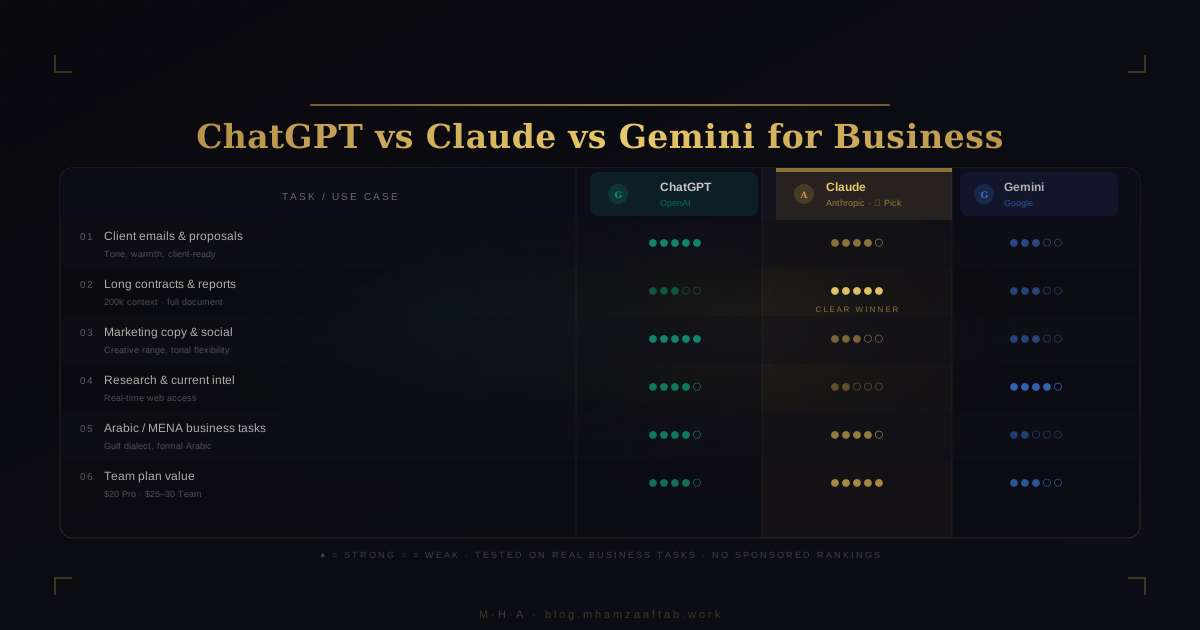
The short verdict: ChatGPT for client-facing writing and generalist teams. Claude for long documents and professional services firms. Gemini only if you are already on Google Workspace. What follows is the reasoning, a task-by-task breakdown, and a profile guide you can act on.
The 60-Second Verdict
| Tool | Best for | Weakest at | Price/user/month |
|---|---|---|---|
| ChatGPT (OpenAI) | Client emails, proposals, marketing copy | Context quality degrades past 35 dense pages | Free / $20 Plus / $30 Team |
| Claude (Anthropic) | 60+ page contracts, RFPs, board reports, compliance submissions | Fewer third-party integrations; harder internal adoption sell | Free / $20 Pro / $25 Team |
| Gemini (Google) | Teams already inside Google Workspace | Standalone writing quality; negligible value outside Workspace | $20 personal / Workspace-bundled |
| Microsoft Copilot | M365 users: Word, Excel, Outlook, Teams | Not competitive outside M365; test before adding a second subscription | $30/user M365 add-on |
One rule covers all platforms: On any free tier, your inputs may be used to train the model. On paid Team and Enterprise plans across all four tools, they are not. If your team handles client contracts, financial data, or personnel information, the only acceptable choice is a paid team plan — regardless of which platform you choose.
What This Decision Actually Costs to Get Wrong
Switching costs are quantifiable. When a team standardises on one AI tool, team members build prompting habits — templates, learned workarounds, muscle memory for consistent output. Switching platforms destroys these. At a 10-person team saving 4 hours per week through AI-assisted work, a bad platform switch costs approximately 80 hours of productivity during the re-learning period. That number doesn't include time spent evaluating alternatives, running pilots, or the quality dip during the transition. Name the number before you make the decision: 80 hours of lost output is the floor.
Fragmentation is its own cost. A business where three people use ChatGPT, two use Claude, and one uses Gemini has no shared prompt library, no consistent output quality, and no institutional knowledge about what works. When someone builds an effective prompt for a vendor negotiation email in ChatGPT, nobody else benefits from it. When someone figures out the right structure for getting useful summaries out of a dense contract in Claude, that knowledge disappears when they change roles or leave. You end up re-inventing the same solutions repeatedly, by different people, on different platforms.
ChatGPT — Best for Client-Facing Writing and Generalist Teams
Where ChatGPT wins the task
For client-facing correspondence — emails, proposals, onboarding documents, follow-up sequences — ChatGPT's default output requires the fewest editing passes to sound like a person wrote it. The register is warm, the sentence rhythm natural, the transitions don't need reworking. When I draft the same brief in ChatGPT and Claude side by side, ChatGPT output consistently needs less intervention before it's ready to send. For client communication at volume, that gap compounds.
Marketing copy is where the advantage is widest. ChatGPT handles the full tonal range that content work demands without requiring separate prompting for each register: punchy subject lines, casual LinkedIn posts, structured landing page sections, five-email nurture sequences. Getting Claude to match that tonal flexibility requires noticeably more prompting — it defaults to measured precision, which is excellent for board reports but needs work to become a warm prospecting email.
GPT-4o multimodal capability earns its keep on competitive research tasks specifically. Paste a screenshot of a competitor's pricing page and ask for a comparison breakdown — you get a structured analysis in two minutes without opening a second tool. Same with a whiteboard photo from a planning session or a chart from an annual report.
Custom GPTs are worth clarifying precisely because the term is often misused. A Custom GPT is a pre-configured chat interface with saved instructions — it is not an API integration. It connects to nothing outside OpenAI's system. What it does is remove the prompt-construction step for repetitive task types so non-technical staff use the tool consistently without building prompts from scratch each time. For a team drafting proposals or support replies repeatedly, that friction reduction is real. It is not the same as connecting ChatGPT to your CRM.
Where ChatGPT breaks down
At the Plus tier, context quality degrades past roughly page 30–35 on dense documents. The model technically holds your document — but synthesis quality deteriorates as length increases. Clause-level precision goes first. The model starts producing accurate-sounding summaries of what contracts in that industry typically say, rather than what your contract actually says. For anything over 40 pages of technical or legal content, Claude handles it more reliably. The opening scenario in this article is the consequence of ignoring that line.
Hallucination with polished delivery is the specific failure mode to understand. ChatGPT states incorrect dates, regulatory figures, and clause numbers with exactly the same confident, smooth tone it uses when it's correct. The polish hides the error. For any output where specific facts carry business or legal weight — contract summaries, compliance documents, financial projections — verify independently regardless of how confident the response sounds. This applies across all AI tools, but ChatGPT's tonal quality makes the problem the least visible.
The free tier is not the same product. The quality difference between GPT-4o on a paid plan and the free model is not marginal for client-facing work. If anyone on your team is using the free tier to draft proposals or client emails, they are producing lower-quality output than they assume — and probably don't know it.
ChatGPT pricing in plain terms
Free: Rate-limited GPT-4o access. Inputs may inform model training under current OpenAI terms.
Plus ($20/user/month): Full GPT-4o access, Custom GPTs, Advanced Data Analysis. Appropriate for individual professional use.
Team ($30/user/month): Shared Custom GPTs accessible across the whole workspace, an admin console with usage dashboard, and explicit exclusion of inputs from model training. Those two features — shared prompting infrastructure and data protection — justify the $10 premium for any company with more than one person using AI regularly.
Who should choose ChatGPT
If the primary workload is client-facing writing, marketing content, or a varied daily mix of task types, ChatGPT is the practical choice. No other platform has built out the Custom GPT ecosystem at the same scale — which matters specifically for teams doing repetitive output work where a pre-loaded prompt template removes friction for non-technical staff.
Claude — Best for Long Documents and Professional Services Firms
The context window advantage in concrete terms
At Pro and Team tier, Claude processes up to 200,000 tokens in a single conversation — roughly 150,000 words, or an entire 300-page legal agreement. Take the 60-page RFP from the opening — paste the whole document in, and Claude holds the entire thing in context. When you ask a question about a penalty clause on page 12, the model can reference the supplementary conditions on page 47 that modify it. ChatGPT at Plus tier cannot do this reliably past 35 pages of dense material.
The work this enables is specific: full acquisition agreement review, RFP responses that require cross-referencing technical annexes, financial annual report analysis before an investment call, compliance submissions that depend on reconciling multiple regulatory documents. These tasks either break other models or degrade in quality as document length increases. Claude holds them.
The Projects feature on Pro and Team tiers adds persistent context across sessions. Upload your company overview, standard contract templates, product brief, and baseline instructions once — they apply to every conversation in that project space without rebuilding context each time. For teams doing repeated document analysis or proposal generation against the same source materials, this cuts the setup time on every session.
Where Claude falls short
Web access is inconsistent depending on tier and model version. For tasks requiring current information — market data, regulatory updates published this quarter, recent news about a specific client or competitor — Claude without search tools is the wrong primary tool. ChatGPT with browsing enabled or Gemini handles live-source research better.
Third-party integrations are fewer than ChatGPT's. The GPT Store has thousands of pre-built connectors for Notion, HubSpot, Zapier, Slack, and others. Claude's third-party library is growing but not at the same scale. If you want AI connected to existing business tools without a developer involved, ChatGPT has more ready-made options today.
Brand recognition friction is easy to underestimate. Getting non-technical employees to adopt a tool they haven't heard of takes more change management effort than expected. "Use Claude for these contract reviews" is a harder internal sell than "use ChatGPT for this," even when Claude is the clearly better tool for the specific task. Factor that adoption friction into the decision, especially in larger teams.
Claude pricing in plain terms
Free: Claude Sonnet access, rate-limited.
Pro ($20/user/month): Full model access, Projects, priority access during high-demand periods.
Team ($25/user/month): Shared Projects across the workspace, admin console, collaboration features, and explicit exclusion of inputs from model training. Minimum 5 users.
At the team level, Claude is $5 cheaper per user than ChatGPT Team. At 10 users, that is $600 per year — not decisive on its own, but worth naming.
Who should choose Claude
Professional services — legal, consulting, finance, audit — anywhere that getting a specific detail wrong carries liability weight. Those are the firms where Claude's document depth and formal tone pay for themselves. If your primary workload is client emails and marketing content, the adoption friction is not worth navigating.
Gemini — If Your Team Already Lives in Google Workspace, Check Your Admin Console First
When Gemini is genuinely useful
Gemini's value is location, not model quality. When it's integrated into Gmail, Docs, Sheets, and Slides, it removes the copy-paste workflow that makes other AI tools friction-heavy for non-technical staff. Instead of opening a separate browser tab, pasting text, copying the response back, and reformatting, the user clicks a button inside the tool they're already working in. For teams that live inside Google Workspace — where Gmail handles communication and Docs is where collaborative writing happens — that friction reduction adds up fast across daily use.
Live search via Google is meaningful for research tasks. Current market data, recent news about a client's sector, pricing that changes frequently — Gemini pulls from live sources where ChatGPT and Claude (without specific tools enabled) work from training data with a knowledge cutoff.
The most important point: check your Google Workspace admin console before spending anything. Several Business and Enterprise tiers include Gemini features at no additional charge. The included capabilities vary by tier and change as Google updates its plans. Many businesses are paying separately for access they already have. Five minutes in the admin console is worth more than any comparison article on this question.
When Gemini is the wrong choice
Outside Google Workspace, Gemini offers almost nothing that ChatGPT or Claude doesn't do better. The standalone interface at gemini.google.com is noticeably less polished than ChatGPT's. For tasks without a natural Workspace home — drafting a cold outreach email from scratch, summarising a PDF that isn't in Drive, brainstorming campaign concepts — conversational quality falls behind both competitors consistently.
Creative and persuasive writing requires more editing to reach ChatGPT's one-pass quality. Gemini handles internal factual summaries acceptably. Anything where tone, persuasion, or reader engagement matters needs a revision pass that ChatGPT usually doesn't.
The value proposition is the Workspace integration, not the underlying model. If your business doesn't primarily run on Google Workspace, the case for Gemini essentially disappears.
Who should choose Gemini
Teams already on Google Workspace who have confirmed via the admin console that Gemini isn't included in their existing plan. Everyone else: ChatGPT or Claude.
Microsoft Copilot — Test It Before You Buy ChatGPT
Copilot has specific and limited value. Within Microsoft 365, it's genuinely useful — and that context deserves precision rather than a dismissal.
Native M365 integration is where Copilot earns its keep. Excel formula generation for non-technical users: describe the calculation in plain language, get a working formula. Meeting summaries in Teams turn 45 minutes of notes into action items without anyone touching a keyboard afterward. Outlook draft replies reduce friction for teams handling high-volume correspondence. Word document drafting works cleanly within the existing document context. These features are useful precisely because they require no context switching — the AI is already inside the tool.
Run Copilot on your actual primary use cases for two weeks before adding any new AI subscription. If it handles them at an acceptable quality level, stop there — you are already paying for the M365 subscription that includes it. Many businesses that add ChatGPT on top of M365 have never seriously tested Copilot on their recurring tasks.
Outside M365, evaluated on writing quality or document analysis as a standalone tool, Copilot falls behind ChatGPT and Claude. That is not a reason to dismiss it entirely — it is a reason to test it on the tasks you actually do before drawing a conclusion.
Who should choose it: M365 users who have tested Copilot on their actual recurring tasks and found it acceptable. Not anyone else.
Which AI for Which Business Task — The 2026 Decision Matrix
| Business Task | Best Choice | Why |
|---|---|---|
| Vendor rejection email to a long-term supplier | ChatGPT | Warmest tone; least editing to sound like a person |
| Summarising a 60-page contract or RFP | Claude | 200k context window holds the whole document |
| Quarterly board report or investor update | Claude | Formal precision; minimal editing required |
| Cold outreach email sequence (5 emails) | ChatGPT | Tonal range; punchy to warm without separate prompting |
| Spreadsheet formula generation | Gemini (Sheets) or Copilot (Excel) | Native integration removes copy-paste friction |
| Meeting notes to action items | Gemini (Meet) or Copilot (Teams) | Native meeting integration |
| Arabic client email or proposal | ChatGPT or Claude | Both clearly ahead of Gemini for Gulf business Arabic |
| Competitor research with current data | ChatGPT or Gemini | Live search capability |
| Customer support reply drafts (high volume) | Claude | Conservative, formal; fewer hallucinated specifics |
| Legal or financial document review | Claude | Largest context window; careful with specific details |
| Marketing landing page copy | ChatGPT | Creative quality; handles brevity and persuasion |
| RFP or tender response writing | Claude | Long source documents plus structured formal output |
| Brainstorming product names or campaign concepts | ChatGPT | Creative divergence; more usable options per prompt |
| Internal HR documentation or policy drafts | Claude | Precise, measured language; formal default tone |
The 40-page rule applies consistently: paste a dense document into ChatGPT at the Plus tier past 35 pages and synthesis quality drops. Clause-level precision goes first — the model starts producing accurate-sounding summaries of what contracts in that industry typically say, not what your contract actually says. For anything over 40 pages of technical or legal content, Claude is the practical choice regardless of how other metrics compare.
Tone is where the difference shows up most clearly in day-to-day use. ChatGPT's default register is warmer and more natural for external client correspondence — it reads like a competent colleague wrote it. Claude's default is measured and precise — it reads like a professional firm drafted it. For most businesses, the right configuration is contextual: ChatGPT for external client-facing writing, Claude for formal internal and legal-adjacent work.
For Arabic tasks, ChatGPT and Claude are both ahead of Gemini for Gulf business Arabic — but neither is reliable enough to skip review. All three models mix registers without signalling it, transliterate proper nouns inconsistently, and occasionally produce grammatically correct phrasing that reads as regionally inappropriate for a Gulf business audience. The Arabic section below covers the specific failure modes and the mandatory review rule.
The full picture of what's possible when you connect these models to your actual systems — RAG pipelines, CRM integrations, automated document workflows — is in the how to add AI to your business in 2026 article.
Match Your Business Type to the Right Tool
| Business Profile | Recommended Tool | Why |
|---|---|---|
| Solo founder or freelancer | ChatGPT Plus ($20/month) | Widest task range for a single seat; Custom GPTs available |
| Early startup (2–5 people) | ChatGPT Team ($30/user/month) | Shared Custom GPTs, data protection, admin controls |
| Professional services firm | Claude Team ($25/user/month) | Document depth, formal tone, inputs off training |
| E-commerce or marketing agency | ChatGPT Team ($30/user/month) | Creative output quality; tonal range for campaign work |
| Google Workspace-first team | Gemini for Workspace | Native integration is the differentiator — confirm via admin console |
| Mixed use or uncertain | Run a two-week pilot | Give five people one platform; measure what gets used daily |
For the mixed-use or uncertain row: give five people one platform for two weeks and measure whether it becomes part of their daily habit. The one that does is your answer — not the one that scored highest in a benchmark, not the one your IT reseller pitched. People vote with their behaviour, not their survey responses.
The data privacy rule from the verdict table applies across every row: free tiers on every platform carry training data risk, regardless of which tool you choose.
Arabic Language and UAE/MENA Considerations
ChatGPT and Claude both handle Modern Standard Arabic and Gulf business dialect at a level useful for routine tasks — drafting emails, translating documents, producing structured reports that go through internal review before reaching a client. For everyday business Arabic with a human review step built in, both are usable starting points. Gemini is improving but is not at the same level for nuanced Gulf-specific vocabulary and register in 2026.
The failure modes are worth naming specifically because all three models produce them without flagging it. Register mixing — moving between formal MSA and colloquial Gulf dialect within the same document — is the most common. Inconsistent transliteration of proper nouns (company names, personal names, place names) is the second. The third is grammatically correct phrasing that reads as regionally inappropriate: right grammar, wrong register for a Gulf business context. These occur in practice on routine outputs, not edge cases.
For any client-facing or high-stakes Arabic output, native Gulf Arabic speaker review is mandatory regardless of which model produced it. Legal documents, government proposals, investor communications — AI-generated Arabic is a first draft, not a finished product. Build the review step into the workflow from the start rather than adding it as a last-minute quality check.
DIFC-regulated businesses and firms handling sensitive client data should review data residency terms on enterprise plans before deploying any cloud AI tool for client work. The free-versus-paid distinction matters most here: paid enterprise plans include explicit data governance terms, data processing agreements, and in some cases regional data residency options. For Dubai financial services operating under DIFC or ADGM regulation, the enterprise tier is the only defensible choice for AI workflows that touch client data.
What Your Developer Sees When You Pick One
The chat interface and the API are different products. Most SMBs don't start with that distinction in mind — they pick a chat tool, then six months later ask their developer to connect it to something, and that's when the choice starts to matter.
ChatGPT — what the developer sees
The OpenAI API is the most documented, most community-supported API in the AI space. More tutorials, more pre-built connectors, more third-party integrations than any competitor. For a developer picking up a new AI integration project, the barrier to finding working examples and specific answers is lower here than on any other platform.
The Assistants API handles vector storage and document retrieval natively — the developer doesn't need to build that infrastructure from scratch. For workflows involving document upload and retrieval, that saves significant development time compared to building the same capability on Claude or Gemini.
One distinction that matters: a Custom GPT and an API integration are not the same thing. A Custom GPT is a sandboxed chat interface with pre-loaded instructions that connects to nothing outside OpenAI's system. An API integration connects ChatGPT to your CRM, your database, or your email inbox. If someone offers to "build you a Custom GPT" as a business integration, ask specifically what it connects to. If the answer is "it has your instructions pre-loaded," that is a prompt template, not an integration.
Claude — what the developer sees
The 200,000 token context window changes architecture decisions in ways that matter for production systems. Many document processing workflows that require chunking, embedding, and vector databases on other models can be handled in a single API call with Claude. Simpler architecture means fewer failure points and easier maintenance — for document-heavy workflows, this is the most underappreciated developer advantage of the three platforms.
Prompt caching significantly reduces API cost for repetitive workflows. If the same large document or system prompt is being passed with every request, the cached portion is billed at a fraction of the input token cost. For high-volume production workflows, this changes the economics meaningfully enough to affect build decisions.
One practical constraint: Anthropic's rate limits at lower API tiers can be a production concern for high-volume workflows. For a small pilot or internal tool, it's not an issue. For a production system handling hundreds of requests per hour, rate limits need to be accounted for in the architecture from the start.
Gemini — what the developer sees
Google Cloud and Vertex AI give Gemini the highest compliance ceiling among the three — data residency options, audit trails, and the enterprise certifications that regulated industries actually require. If the primary concern is data governance rather than model capability, this is the differentiating argument for Gemini at the API level.
Google Apps Script integration lets non-technical staff connect Gemini to Sheets, Docs, and Gmail workflows without complex infrastructure. For businesses already invested in Google Workspace automation, this is meaningfully lower friction than building a separate integration layer.
The API surface changes more frequently than OpenAI's or Anthropic's. Deprecation cycles are shorter, model versioning requires more active maintenance, and breaking changes have appeared in production workflows without adequate lead time. Expect higher ongoing maintenance overhead than with either competitor.
Why your tool choice shapes your integration options
The chat tool your team uses and the API your developer builds on should ideally be the same platform. Context transfers. Familiarity reduces onboarding friction, and the vendor relationship stays simpler. Before standardising your team on a chat platform, ask: if we want to connect this AI to our systems in six months, does this platform support that cleanly? For most SMBs, ChatGPT and Claude are both solid answers to that question. Gemini is the right answer specifically when Google Cloud is the existing infrastructure.
When the Chat Interface Is No Longer Enough
A Team plan used consistently by five people saves hours of writing and analysis work every week. Most businesses start here and finish here. That is a legitimate outcome — for most businesses the chat tool handles everything that needs handling, and stopping there is not failing to capture some theoretical upside.
The ceiling appears after a few months of consistent use. You want the AI to answer questions about your specific customer list, not customers in general. Contracts processed automatically when they arrive in the inbox — not when someone remembers to paste them into a chat window. Customer support drafts that already include that account's purchase history and open issues. Inbound emails routed to the right team member based on your internal definitions, not on general business logic. None of that is possible through the chat interface.
The connection has to go at the infrastructure level: the AI needs to be wired into your systems — your CRM, your document storage, your email inbox, your product database. That is a software integration, not a chat tool upgrade. A developer builds a layer that retrieves relevant data from your systems and passes it to the model before generating a response. The model answers using your data, not general knowledge about companies like yours.
I build these integrations for businesses in Dubai and across the MENA region — RAG pipelines, Claude API and OpenAI API integrations, custom automation connected to your actual data. My contact page is the right starting point. One conversation is usually enough to figure out what's worth building for your situation.
The full cost and implementation breakdown — what each tier of AI integration actually costs and what it takes to build — is in how to add AI to your business in 2026. If you're evaluating whether a custom integration makes sense against no-code automation tools, that decision is covered in no-code vs custom development. If you're deciding whether to bring in a developer as a freelancer or through an agency, that comparison is in freelance developer vs agency. One of the most common integration requests is connecting AI to a CRM — the best CRM for startups in 2026 guide covers the options worth connecting to. When you're ready to bring a developer in, the Dubai developer hiring checklist covers what to verify before you sign.
Frequently Asked Questions
Is Claude better than ChatGPT for business?
For document-heavy work over 40 pages, Claude wins clearly. For marketing and client-facing writing, ChatGPT does. The distinction is consistent: paste the same 60-page contract into both, and Claude references specific clauses across the full document while ChatGPT produces summaries that become increasingly generic past page 35. For businesses where that distinction matters — legal, consulting, finance — Claude is the right default. For businesses where the primary workload is client emails and marketing content, ChatGPT is. Most SMBs doing a mix of both should test each on their actual most-frequent tasks rather than relying on a comparison guide to decide.
Is Gemini free for businesses?
Gemini has a free tier at gemini.google.com, but the version that's useful for businesses — with native Gmail, Docs, Sheets, and Slides integration — typically requires a Google Workspace add-on or is included in higher Business and Enterprise tiers. Check your Google Workspace admin console before paying for anything. Several plan tiers include Gemini access that many businesses aren't aware of. If your plan doesn't include it, verify current pricing at workspace.google.com directly — Google changes these bundles frequently and secondary sources go stale.
Is it safe to use these AI tools for confidential business documents?
On free tiers across all platforms, your inputs may be used to train the model. On paid Team and Enterprise plans — ChatGPT Team, Claude Team, Gemini for Workspace enterprise tiers, Copilot for M365 — inputs are explicitly excluded from model training. The rule is straightforward: if the document is confidential — a client contract, a financial projection, personnel information — only use it on a paid team or enterprise plan. Free tiers on every platform carry training data risk. This is not fine print to skim past.
Which AI works best in Arabic for Gulf business use?
ChatGPT and Claude are both ahead of Gemini for Gulf business Arabic in 2026. Both handle MSA and Gulf dialect at a usable level for routine tasks. The failure modes apply to both: register mixing without flagging it, inconsistent transliteration of proper nouns, and occasionally grammatically correct phrasing that reads as regionally inappropriate for a Gulf business context. Human review by a native Gulf Arabic speaker is mandatory for any client-facing or high-stakes Arabic output — legal documents, government proposals, investor communications — regardless of which model produced it. Test a sample from your actual use case before committing to a workflow.
What is the difference between ChatGPT Plus and ChatGPT Team?
ChatGPT Plus is a personal subscription at $20/user/month — you get full GPT-4o access and Custom GPTs in a personal workspace. ChatGPT Team adds three things that matter for businesses: shared Custom GPTs accessible across the whole team, an admin console for usage management, and explicit exclusion of team inputs from model training, at $30/user/month. For any company with more than one person using AI regularly, Team is the right structure. The shared prompting infrastructure alone justifies the $10 premium — when one person builds an effective prompt template, everyone benefits from it.
Do I need a developer to use these AI tools?
No — the chat interfaces for ChatGPT, Claude, and Gemini require no technical setup. You open a browser tab and start. A developer becomes relevant at a specific point: when you want the AI connected to your actual systems — your CRM, your document inbox, your customer database — responding with your specific data rather than general knowledge. That connection is a software integration, not a chat tool upgrade. The distinction between off-the-shelf chat tools and custom API integrations is worth understanding before you decide how much to invest. If that's where you're headed, the When the Chat Interface Is No Longer Enough section above covers what the integration path looks like in practice — and my contact page is the right starting point.
Is Microsoft Copilot better than ChatGPT for business?
Inside Microsoft 365, Copilot earns its keep for Excel, Outlook, Teams, and Word. As a standalone writing or reasoning tool evaluated against ChatGPT or Claude, it falls behind both. The right frame isn't which is better — it's whether Copilot handles your actual recurring tasks at an acceptable quality level before you add a separate subscription. Run it on your most frequent work for two weeks. If it's good enough, you're already paying for it through your M365 subscription. If it falls short on quality for your specific workflows, then ChatGPT or Claude is the relevant comparison.