The Best Project Management Tools for Startups in 2026 (No Sponsored Rankings)
Asana, ClickUp, Linear, Jira, Monday.com — ranked honestly by a developer who's used them all. Choose the right tool for your startup's stage, not just your feature list.

This article may contain affiliate links. See our Disclaimer for details.
Somewhere around the third PM tool migration of your startup's first year, the pain becomes real. Trello felt right at two people — simple, visual, nothing to configure. Then you hired a developer, added a designer, and suddenly "backlog" means twenty sticky notes with no owner, no due date, and no record of what's blocking what. You move to ClickUp. Six weeks of configuration later, your team spends more time organizing tasks than completing them. You look at Linear. The developer loves it. Your ops person has never heard the word "cycle" used to mean a two-week work period. Jira is next on the shortlist. The docs alone take a morning to parse.
Almost every "best project management tools for startups" article ranking on the first page of Google is either sponsored by one of the tools it covers or earning referral commissions when you sign up. I have no referral relationship with any tool in this guide. No affiliate links, no preferred partner arrangements, no "Start free trial" buttons sewn into every section header. If you want a recommendation from someone who has shipped product inside enough startups to have real opinions about what works at what stage, read on.
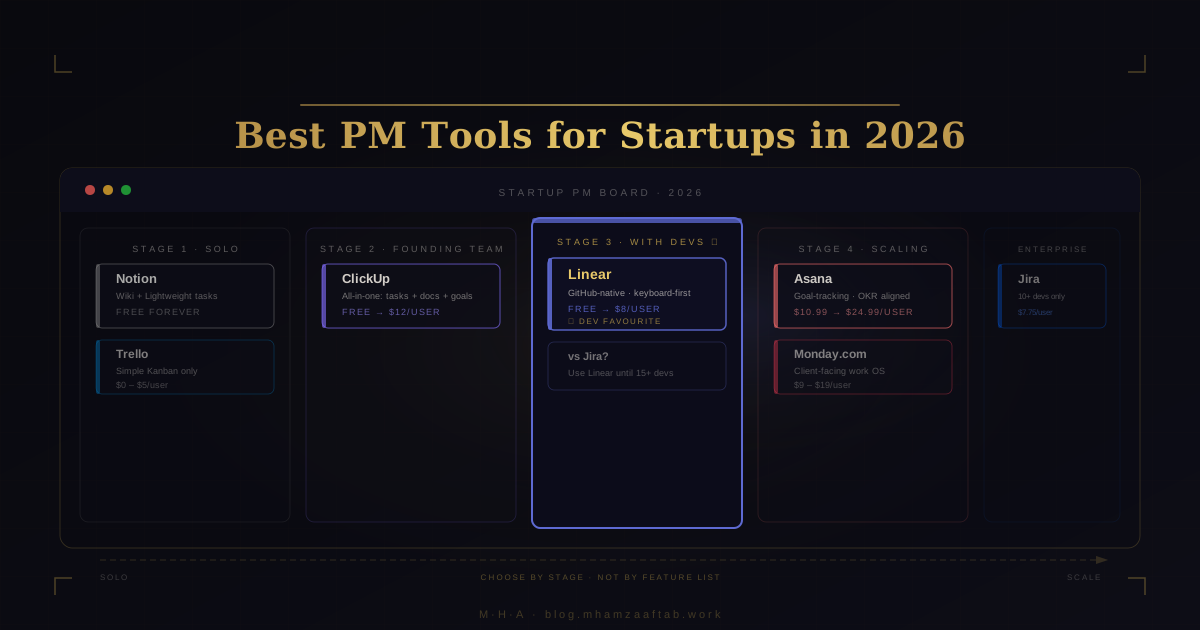
The short answer, for founders who need a verdict: Solo or pre-revenue? Use Notion. Early founding team, no developer yet? ClickUp Free. Building product with a developer on the team? Linear. Scaling past 15 people? Asana or Monday.com, depending on whether your primary work is internal or client-facing. The rest of this article explains why those recommendations hold, when they break down, and how to avoid the tool-switching cycle that costs a week of setup and a month of team friction every time it happens.
How to Read This Guide — Choose by Stage, Not by Feature List
Every PM tool comparison article ranks tools by feature count. This one doesn't, because feature count is the wrong metric for a startup. A tool that serves a 25-person company actively harms a 2-person team — not because it's bad software, but because configuration overhead consumes the time you're supposed to spend building product.
The right question is not "which tool has the most features?" It's "which tool fits the way my team works right now?" That depends on two variables: your team's size and stage, and the underlying PM philosophy you're actually choosing between.
Four stages are relevant:
- Solo / validation — 1–2 people, pre-revenue, idea still being tested
- Early founding team — 2–5 people, mixed roles, no developer yet (or just one)
- Product-building with dev team — 5–15 people, includes developers, shipping regularly
- Scaling — 15+ people, multiple functions, cross-functional coordination, possibly client work
Tools that are marketed as "best overall" — ClickUp, Monday.com — are consistently the wrong answer for the first stage and consistently viable for the third or fourth. The mismatch is the problem, not the tool.
The Four PM Tool Philosophies (What You're Really Choosing)
Underneath the feature marketing, every PM tool is one of four things. Identifying which philosophy fits your team answers 80% of the tool selection question.
Kanban-visual — Work is represented as cards moving across columns: To Do → In Progress → Done. Simple mental model, fast onboarding. Trello is the purest form. ClickUp supports it alongside ten other views. Best for teams with linear, non-interdependent workflows.
Goal-tracking — Work is attached to objectives. Every task rolls up to a milestone, every milestone to a company-level goal. Asana is the clearest example. Best for teams where alignment — "how does my work connect to what we're trying to accomplish this quarter?" — is the primary management problem.
Everything-hub — One platform for tasks, docs, dashboards, time tracking, goals, and sometimes CRM-adjacent features. ClickUp fits here. Best for small founding teams handling mixed roles that need to consolidate tools to reduce subscription overhead. The tradeoff is configuration complexity.
Engineering-native — Built around the software development workflow: sprints, issues, pull requests, GitHub integration, keyboard-first navigation. Linear and Jira are the two examples. Opaque to non-developers. Excellent for technical teams that want their PM tool to think the way they think.
Quick Verdict — The Right Tool for Your Startup Stage
Before going deep on each tool, here is the stage-by-stage decision in one place.
| Stage | Recommended tool | Why |
|---|---|---|
| Solo / validation (1–2 people) | Notion | Free, flexible, zero learning curve |
| Early team, no devs (2–5 people) | ClickUp Free | More structure than Trello at no cost |
| Building with devs (5–15 people) | Linear | Developers ship faster on it |
| Scaling (15+ people) | Asana or Monday.com | Depends on internal vs client-facing work |
The full comparison across all seven tools:
| Tool | Best for | Free tier reality | Entry price/user | Learning curve | GitHub integration | Arabic/RTL | Dev preference | Switching difficulty |
|---|---|---|---|---|---|---|---|---|
| Linear | Startups with developers | 250 issues then paid | $8/mo | Low (for devs) | Native, excellent | No | Highest | Medium |
| ClickUp | Mixed founding teams | Generous but 100MB storage cap | $7/mo | High | Decent | Partial | Medium | High |
| Asana | Goal-aligned teams | 15-user cap, no timeline view | $10.99/mo | Medium | Basic | No | Low | Medium |
| Monday.com | Client-facing service startups | 2 seats only | $9/mo (3-seat min) | Low–Medium | Basic | Yes | Low | High |
| Notion | Solo / pre-team | Genuinely generous | $10/mo | Low | None | Partial | Medium (planning) | Low |
| Jira | Engineering orgs 10+ devs | Solid (up to 10 users) | $7.75/mo | Very High | Excellent | No | Medium | Very High |
| Trello | First PM tool, ever | 10-board cap | $5/mo | Very Low | Basic | No | Low | Low |
The Free Tier Reality Check
"Free forever" is the standard marketing claim. What it actually means varies considerably between tools.
ClickUp Free: Unlimited tasks and members, but 100MB total storage and no dashboard widgets. Workable for task management, but the storage cap appears faster than you expect once the team starts attaching design files and documents.
Asana Free: Up to 15 users, which sounds generous. The missing feature is the timeline view — you cannot see how tasks overlap across time or visualize dependencies without upgrading to Premium. For any team managing interdependent deliverables, that gap shows up fast.
Monday.com Free: Two seats only. This is not a typo. You cannot use Monday.com's free plan with a three-person team. It functions as a solo evaluation tool, not a startup team tool. This is the most misleading free tier in this category.
Linear Free: 250 issues per team. On a small team with one or two developers tracking active work, this can last six months or longer. When you hit the ceiling, $8 per user per month is a reasonable ask for what the tool delivers.
Notion Free: The most useful free tier in this list. Unlimited blocks and pages for individuals. Teams need the Plus plan ($8/user/month) for collaborative features, but a solo founder can run an entire knowledge and task stack on Notion free.
Trello Free: 10 boards, unlimited cards, 250 automation runs per month, no dashboard or timeline view. For a team tracking one product, 10 boards is sufficient. For a team with multiple concurrent projects, it runs out quickly.
Jira Free: Up to 10 users with a capable feature set — backlog, sprints, basic roadmap, 2GB storage. The free tier is more capable than most people credit. The problem at small scale is not price — it's configuration complexity before you extract any value.
Linear — Best for Startups with a Developer on the Team
If your team includes at least one software developer and you're choosing a PM tool for the first time, start with Linear. The argument is direct: engineers ship faster when they're not fighting their tooling.
Linear's vocabulary is translatable for non-developers: issues are tasks, cycles are sprints (fixed-length work periods, typically two weeks), and projects are epics — a named collection of issues working toward a single deliverable. If you've used any PM tool before, the model takes about an afternoon to internalize. If you haven't, the Linear help docs are well-written enough that it doesn't matter.
What developers actually value about Linear — the part a non-technical founder needs to understand — is not the vocabulary. It's the GitHub integration. When a developer opens a pull request and includes the issue number in the PR title or description, Linear automatically moves the linked issue to In Review. When the PR merges, the issue closes. No one has to remember to update a board. No project manager has to track down developers to move their cards. Status reflects reality automatically.
The keyboard-first design matters too. Developers live in their keyboards. Linear can be navigated entirely without a mouse: create an issue, assign it, set a priority, attach it to a cycle — all from the keyboard. For someone who types code all day, that is not a small thing.
Pricing: free up to 250 issues per team, then $8 per user per month. At a three-person startup — one developer, one founder, one designer — that's $24/month for a tool that eliminates the overhead of manually syncing GitHub with your task board.
Linear vs Jira — The Honest Comparison
Under 15 developers, Linear wins. This is not a close call.
The comparison is not about feature parity. Jira has more features. It is about what those features cost in setup time, configuration complexity, and developer morale. Starting on Jira at a 4-person startup means spending a week configuring workflow states, permission schemes, and issue type hierarchies before your team can use it for anything useful. Linear works on day one.
Jira's advantages — enterprise audit logs, complex role-based access control, Confluence integration, configurable compliance workflows — become relevant at scale. For a team of four building an MVP, none of those advantages matter, and all of the overhead does. Most startups that choose Jira for their first few developers because "it's what enterprises use" spend their first year wishing they'd started simpler.
If you are evaluating your core tech stack at the same time as your PM tooling — deciding between React Native and Flutter, for instance — the tool-selection discipline is the same. See React Native vs Flutter for Startups in 2026: default to the simpler option, add complexity when you have the volume to justify it.
When NOT to Use Linear
Linear has specific, predictable limitations. Know them before you commit.
There is no Gantt chart or timeline view. If stakeholders need to see how work maps across calendar dates — a roadmap spanning three months, a dependency chain between design and development milestones, overlapping work streams with shared deadlines — Linear cannot show you that. You can see the scope of a cycle, but not how cycles land against a product calendar.
Linear is also not built for non-developer teams. A marketing or operations team using Linear would be working against the tool's assumptions constantly. If your team is currently all non-technical — founder plus ops — don't start on Linear. Move to it when you hire an engineer.
No native time tracking. If you need to track billable hours or report on task duration, you'll need an integration (Toggl, Harvest) or a different tool entirely.
ClickUp — Best All-in-One for Early-Stage Founder-Led Teams
ClickUp is the Swiss Army knife of PM tools — and like a Swiss Army knife, the value depends entirely on whether you actually need all those tools or whether you'd be better served by one well-designed blade.
What ClickUp consolidates into a single platform: tasks, subtasks, docs, goals, dashboards, time tracking, workload view, sprints, custom fields, forms, CRM-adjacent features, and automations. For a three-to-eight person founding team where everyone is wearing multiple hats — founder handling sales and strategy, co-founder on product and hiring, first hire managing ops and customer success — this consolidation earns its keep. Replacing three or four separate subscriptions with one tool, even at $7/user/month, is a meaningful saving before you have revenue to spare.
The tradeoff is configuration complexity. ClickUp's flexibility is also its most common failure mode. Because it can be almost anything, you have to decide what it should be — and that decision, made badly or revised repeatedly, becomes expensive in the time it consumes.
Pricing: free forever for unlimited tasks and members (with storage and widget limits), then $7/user/month for Unlimited (removes limits, adds integrations), and $12/user/month for Business (advanced dashboards, workload management, custom permissions).
The ClickUp Overwhelm Problem — How to Avoid It
The most common complaint from founders who tried ClickUp and abandoned it is some version of: "We spent more time configuring it than using it." This failure mode is predictable, and it's avoidable.
ClickUp surfaces every feature it offers simultaneously. When you first log in, you are presented with views, spaces, folders, lists, widgets, automations, custom fields, and dashboard options — all at once. Most teams try to configure everything correctly before they start using the tool, which means two weeks of setup followed by a team that still doesn't know where to put things.
The fix is aggressive simplicity at the start:
- Use the Startup template — it gives you a sensible default structure without requiring you to design one from scratch.
- For the first 90 days, use only List view and Board view. Do not touch dashboards, goals, or automations until the basic task flow is settled and consistent.
- Resist building automations until the manual version of the process works reliably. Automating a broken workflow makes it a faster broken workflow.
The goal is value from ClickUp in the first week, not a perfect system in the first month. The perfect system is the one your team actually uses.
ClickUp vs Asana for a 5-Person Startup
This is a genuine toss-up at five people, and the right call depends on what kind of work your startup does.
Choose ClickUp if your team manages mixed work — product development, ops, customer support, client projects — and you want to consolidate into one tool rather than pay for task management, docs, and time tracking separately. The all-in-one model earns its value here.
Choose Asana if your work is primarily project delivery and your primary management challenge is keeping everyone aligned on goals and deadlines. Asana's interface is cleaner, its onboarding is faster, and its goal-tracking architecture is more deliberate. A team with structured deliverables and clear milestones will find Asana's opinionated structure helpful rather than limiting.
The price gap is real but probably not decisive: ClickUp at $7/user versus Asana at $10.99/user is $3.99 per person per month. At five people, that is $20/month. If Asana is clearly the better fit, the extra $240/year is not the deciding factor.
Asana — Best for Startups Focused on Goals and Team Accountability
Asana's defining feature — the one that actually sets it apart from ClickUp and Monday.com — is the way it connects individual tasks to company-level objectives. A task belongs to a project, a project rolls up to a portfolio, a portfolio contributes to a goal. The hierarchy is opinionated and visible, which means every team member can see how their specific work connects to what the company is trying to accomplish.
That connection matters most at teams of 8–20 people, when work starts to fragment and nobody quite knows how their sprint tasks connect to what the company is trying to accomplish this quarter. Before that size, the goal hierarchy is overhead. After it, the hierarchy is the thing that keeps 15 people pulling in the same direction instead of each optimizing their own corner.
The trade-off is that Asana doesn't have meaningful developer tooling. There is no native GitHub integration worth mentioning, no engineering-native vocabulary, and no sprint management built for developers. Asana is a project management tool. If your team's primary output is code, the mismatch will be apparent quickly.
Pricing: free for up to 10 users (no timeline view, limited reporting), $10.99/user/month for Premium (timeline, custom fields, advanced search, 500+ integrations), $24.99/user/month for Business (portfolios, goal tracking, workload management). The Business tier is where the full goal-alignment functionality lives — without it, you're paying $10.99/user for a tool missing the feature that defines it.
Asana vs Monday.com — Which Is Actually Better?
They're solving different problems, which is why most head-to-head comparisons produce a draw.
Asana is a better fit if your primary work is internal project delivery — product roadmaps, marketing campaigns, operational processes. The goal-tracking hierarchy is the differentiator, and it works well for teams running quarterly objectives.
Monday.com is a better fit if your startup manages external client work alongside internal projects — deliverables for external stakeholders, shared project visibility, status reporting to people outside your organization. Monday.com's flexibility and client-sharing features give it an advantage in that context.
On free-tier value alone: Asana beats Monday.com cleanly. Ten users versus two is not a close comparison. At the stage where you are comparing free tiers, Asana wins.
When Asana Is Overkill
If your team is two people and pre-revenue, Asana is solving problems you don't have yet. The goal-hierarchy model assumes you have enough work and enough people to need to connect tasks to objectives. At sub-$10k MRR with two people, you know what you're trying to do — you don't need a tool to remind you.
Start with Notion or Trello. Move to Asana when you have five or more people coordinating deliverables and you are regularly discovering that someone didn't know a task was their responsibility, or a deadline passed without visibility.
Monday.com — Best for Startups Managing External Client Work
Monday.com markets itself as a "Work OS" — a platform for any kind of work, internal or external, structured or unstructured. The pitch is as broad as it sounds. And the product largely earns it: the visual grid interface is immediately legible to anyone who has ever worked in a spreadsheet, onboarding takes a day, and it's flexible enough to model most workflows without a configuration phase.
Where it earns its keep: startups managing client deliverables. If you're running a consulting firm, a creative agency, a managed services business, or any model where external clients need visibility into project status, Monday.com's shared workspaces and client-friendly interface are an advantage over tools designed purely for internal use.
Where it doesn't: pure product startups where most of the work is engineering-heavy and internal. The feature set becomes overhead you're not using — and you're paying Monday.com prices for a tool you're using at ClickUp depth. The pricing section below makes this concrete.
On Arabic and RTL support: Monday.com is one of the few major PM tools with partial RTL layout support. If your startup is operating in the Gulf region with a bilingual team, or you need to share project boards with Arabic-speaking clients, that is a meaningful differentiator over Linear or Asana, neither of which offer RTL.
If you're building out your stack and also evaluating CRM tools alongside your PM software, see Best CRM for Startups in 2026 — Monday.com's CRM-adjacent features are worth understanding in that context before you commit to a two-tool stack.
Monday.com's Hidden Pricing Cliff
Monday.com's pricing is the most frequently misunderstood in this category. Here is the actual cost map.
The free plan is two seats only. Not two admins — two total users. A three-person team cannot use the free plan. It functions as a solo evaluation, not a team trial.
Once you move to paid:
- Basic: $9/seat/month, with a 3-seat minimum — $27/month minimum spend. No automations.
- Standard: $12/seat/month — automations, calendar view, guest access, integrations. This is where Monday.com's actual value proposition lives. Without Standard, you are using Monday.com without the features that differentiate it.
- Pro: $19/seat/month — time tracking, formula columns, private boards, chart view.
At 10 people on Standard (the tier where automations live): 10 × $12 = $120/month, or $1,440/year. Compare that to ClickUp at 10 × $7 = $70/month for similar or greater functionality. The gap compounds with team size.
A five-person team on Standard: $60/month ($720/year). This is the number to compare against ClickUp's $35/month at the same headcount.
Monday.com vs ClickUp for a Non-Technical Founder
If you're a non-technical founder who is more comfortable in spreadsheets than in product documentation, Monday.com's visual grid model will feel familiar faster than ClickUp's multi-view interface. That onboarding advantage matters, especially if nobody on your team has used a PM tool before.
Choose Monday.com if you're managing client relationships and external deliverables, your team thinks in spreadsheet rows and columns, and you need to share project status with people outside your organization.
Choose ClickUp if your team is building a product, you want more flexibility at a lower price point, and at least one person on your team can tolerate a few days of initial setup.
Notion — Best Starting Point Before You Have a Real Team
Notion is a wiki with a lightweight database layer underneath. Not a project management tool — and the distinction matters. Founders who treat it as one hit the same wall every time: tasks fall through, nobody gets notified, and you realize it was never designed to hold anyone accountable.
That said, for a solo founder or two-person founding team, it is the best starting point — not because it has great PM features, but because at that stage, you don't need PM features yet.
At the solo or two-person stage, your primary need is organized thinking: competitor research, product requirements, user interview notes, a basic task list, investor updates, a personal link library. Notion handles all of that in one place, at no cost, with minimal configuration.
The individual free plan is genuinely unlimited for personal use. A solo founder can run an entire working knowledge base — strategy docs, research, a lightweight task list, an early-stage contact tracker — without spending anything.
If you're still in the idea-testing phase, resist the urge to optimize your workflow before you know what you're building. Validating your app idea first is a better investment of your next two weeks than setting up a PM system. Similarly, if you're weighing whether to build with no-code tools or hire a developer, that decision affects your entire workflow choice. See No-Code vs Custom Development for the framework before you commit to either.
When Notion Breaks Down as a PM Tool
Notion has specific, predictable failure points as a PM tool. They tend to appear in a consistent order.
No native recurring tasks. Anything on a regular schedule — weekly standups, monthly reporting, fortnightly syncs — requires a manual workaround. Recurring tasks don't exist natively in Notion.
No accountability notifications. Notion does not send someone a reminder when their assigned task is due tomorrow. There are no dependency notifications. Nobody is automatically informed when a blocker is resolved and their work can resume. You have to remember to check Notion, which is different from a tool that surfaces things to you.
No dependency tracking. If Task A must complete before Task B can begin — the design cannot start until the user research is done, the build cannot start until the design is approved — Notion has no native way to represent or surface that relationship. You can model it manually in a database view, but it's an approximation, not functional dependency management.
No reporting or dashboards. You cannot generate a velocity chart, a completion rate, or a workload view showing who is under pressure this week. At five or more people with interdependent work, those questions become critical. Notion cannot answer them without substantial manual construction.
The trigger to move on from Notion as a PM tool: five or more active contributors who need independent task ownership, due dates, accountability notifications, and visibility into what's blocking each other.
Notion vs ClickUp — The Upgrade Trigger
Three specific signals that it's time to move from Notion to ClickUp:
- You have five or more active contributors who need their own task assignments and independent accountability
- You are regularly missing dependencies — someone didn't know their work depended on someone else's, or vice versa
- You are managing more than one project at once and losing context between them
When those signals appear, ClickUp's native structure — task owners, due dates, subtask hierarchies, dependency flags, and automatic notifications — pays for the configuration investment. The upgrade is worth it at that point, not before.
Jira — Only Worth It Once Your Engineering Team Hits 10+ People
Most PM tool guides pull their punches on Jira. The direct assessment: most early-stage startups should not start on Jira. Not because Jira is bad software — it isn't — but because it is enterprise software, and enterprise software running a 4-person startup creates enterprise overhead without the enterprise scale to justify it.
The issue type hierarchy alone — Epic → Story → Task → Sub-task, each with configurable fields, workflow states, and transitions — takes a week of admin setup before a small team can use it without constant confusion. That week is almost always the first week of the developer's onboarding, which is exactly the wrong time for it.
Workflow state machines in Jira are powerful in regulated environments. Configuring them is an admin task — and at a four-person startup, there's rarely a dedicated Jira admin, so they never get configured right and everyone starts routing around them. Permission schemes — who can transition which issues, who can create epics, who has admin rights across which projects — add another layer of configuration. At a startup, the answer to almost all of those questions is "everyone can do everything," which means you are building a permission framework to grant access you could have assumed from day one.
Pricing: free for up to 10 users — backlog, sprints, basic roadmap, 2GB storage — a functional set of features. After that: $7.75/user/month for Standard (audit logs, 250GB storage, user roles, support SLAs), $15.25/user/month for Premium (advanced roadmaps, capacity planning, unlimited storage).
The free tier is solid. The cost is not the reason to avoid Jira at small scale. The setup time and the developer morale cost are.
Jira vs Linear — The Real Choice for Tech Startups
Under 15 developers: Linear wins. The case is concrete across three dimensions.
Setup speed: Linear works on day one with minimal configuration. Jira requires a week or more of admin setup — issue types, workflow states, permission schemes, notification schemes — before your team can use it efficiently.
Developer morale: Developers who have used both tools consistently prefer Linear. The keyboard-first interface, the clean issue detail pages, and the GitHub-native integration eliminate friction that accumulates into actual lost time across months. Developer morale is a hiring and retention signal too — the tools a team uses reflect the culture they're building.
GitHub integration quality: Linear's GitHub integration is native and opinionated — it automatically closes issues on PR merge and does it reliably. Jira's GitHub integration works but requires more setup and occasional maintenance to stay in sync.
Where Jira wins: Confluence integration for teams with a docs-heavy workflow at scale. Enterprise audit logs and compliance trails for regulated industries (fintech, health, defense). Complex role-based access control for 50+ developers across multiple teams. Enterprise clients that audit your development process and mandate Jira as a delivery requirement.
Most startups that move from Linear to Jira do so at Series B or later, when an engineering manager joins who already operates Jira at scale and brings existing configurations from a previous role.
When Jira Actually Makes Sense
Three legitimate cases for starting on Jira from day one:
If your CTO or engineering lead comes from a large engineering organization where they ran Jira at scale, the switching cost argument reverses. They have templates, workflow configurations, and naming conventions already built — Jira is actually faster for someone with a decade of Jira admin experience than learning a new system from scratch. Asking them to switch to Linear is asking them to rebuild institutional knowledge they already have.
If you're a services startup deploying software into client environments that mandate Jira for project visibility, the tool selection is effectively made for you. Your clients want tickets in their Jira instance, linked to their internal workflows. You don't get a vote.
If your startup operates in a regulated domain — financial services, healthcare data, defense software — where development audit trails must satisfy compliance requirements, Jira handles this at scale. Linear's audit logging does not, at least not to enterprise compliance standards.
Outside those cases: use Linear.
Trello — Best First PM Tool If You've Never Used One Before
Trello deserves credit for one specific thing: you can understand it in 20 minutes. Boards, lists, cards — the Kanban model is visually intuitive and requires almost no training. For a founder who has never used a PM tool and is managing a small, linear feature list with one or two people, Trello is the right starting point precisely because it gets out of your way.
Its limitations are equally specific: no task hierarchy, no sprint management, no dependency tracking, no time tracking, no goal alignment, no reporting, and a 10-board cap on the free tier. If you need any of those things, you will outgrow Trello within a few months regardless of when you start.
Trello's shelf life at most startups: useful until you add a second person with independent work streams, or until your backlog grows complex enough that cards-on-a-board can't tell you who owns what. Most teams hit one of those limits within six months of their second hire.
Pricing: free with 10-board limit and 250 automation runs/month, then $5/user/month for Standard (unlimited boards, unlimited automations), $10/user/month for Premium (dashboard views, timeline, calendar, AI features).
Trello vs ClickUp — The Upgrade Path
When Trello stops being sufficient — typically signaled by the team building workarounds for dependencies, losing context between cards, or running out of boards — ClickUp is the natural migration path.
ClickUp imports directly from Trello. The migration preserves board structure and card data, so you don't lose historical context. More importantly, ClickUp maintains the Kanban model you already know while adding dependency tracking, recurring tasks, subtask hierarchy, and workload visibility that Trello cannot provide. The upgrade path is explicitly designed for this transition, and in practice it takes a day rather than a week.
The Stage-Based Decision Framework — Which Tool Is Right for You Right Now
This section is designed for a quick re-read at the moment of decision. Clear defaults at each stage, no hedging.
Stage 1 — Solo founder / idea validation (1–2 people, no team yet)
Default: Notion (free).
Your primary need is organized thinking, not task tracking. A Notion workspace gives you a product spec, a research database, a task list, and an early-stage contact tracker in one tool, at zero cost, with minimal setup time. The coordination overhead that PM tools solve — who is responsible for what, what blocks what, who needs to know when something changes — doesn't exist with one or two people.
Trigger to move on: you're adding a second person who will work on tasks independently and needs to track their own responsibilities without you managing every assignment manually.
Stage 2 — Early founding team (2–5 people, mixed roles, no developer yet)
Default: ClickUp Free.
Choose ClickUp if your work is complex enough to need subtasks, custom fields, and workload visibility. Choose Trello if your workflow is simple enough that cards on a board covers it and you want even less to configure. Avoid Linear (no developer to use it) and Jira (too much setup).
Trigger to move to Stage 3: you hire your first developer, or you start regularly missing task dependencies — things that needed to complete before other things could begin, and nobody caught the gap. When that hire is approaching, the Upwork vs hiring a developer directly comparison covers both routes before you commit to a platform.
Stage 3 — Building with dev team (5–15 people, includes at least one developer)
Default: Linear if the majority of your team is technical. ClickUp Business if you have a mixed team — ops, product, design, and development — where non-developers would work against Linear's engineering vocabulary daily.
Trigger to move to Stage 4: you need cross-functional reporting your current tool cannot produce, you're managing multiple product lines or client accounts simultaneously, or OKR alignment has become a real management problem rather than a theoretical one. If you're also scoping the cost of what to build at this stage, the MVP development cost breakdown gives you realistic per-sprint figures before you lock in a milestone plan.
Setting up your first sprint with a new developer? I work inside Linear and ClickUp regularly and can align your workflow before day one — task structure, definition of done, milestone cadence. Talk through your project setup → — 30 minutes, no pitch, clear answer on what your first sprint should actually contain.
Stage 4 — Scaling startup (15+ people)
Default: Asana Business if your work is primarily internal and goal-driven — quarterly OKRs, product roadmaps, team deliverables, cross-functional accountability.
Default: Monday.com Standard if your work includes significant client-facing deliverables — shared project boards, external stakeholder visibility, status reporting to people outside your organization.
What Your Developer Actually Wants (and Why It Matters)
This is the section most PM tool comparison articles skip, and it shouldn't be skipped — because the developer you hire will use your PM tool for eight hours a day, and a tool that creates constant friction is a retention problem as much as a productivity one.
Developer PM tool preference in 2026, from most to least preferred by senior engineers:
Linear — the default preference of most experienced product-company developers. Clean, keyboard-first, GitHub-native, minimal configuration overhead. A developer who recommends Linear without being asked is telling you something about how they approach engineering culture — they care about clean workflow and have opinions about tooling. That's usually a positive signal.
Jira — familiar to developers from large engineering organizations. Accepted, rarely loved. A developer who says "I prefer Jira" is typically someone who has spent years on it and doesn't want to learn a new system, not someone who thinks it's the better tool by design. "I know Jira" and "I prefer Jira" are different statements, and it's worth asking which one is true.
ClickUp — workable. Developers on ClickUp teams don't enjoy the tool but don't refuse to use it. The interface is cluttered and the engineering-specific features are less polished than Linear's, but the core task tracking functions adequately. Most developers on ClickUp will track their sprint work there and not think about it much.
Monday.com — the most friction for developers. Monday.com was not designed around how engineers work. The column-based data model, the GitHub integration gap, and the absence of engineering-native vocabulary create friction that compounds. Developers on Monday.com teams frequently track their actual sprint work somewhere else and update Monday.com for reporting. I've heard this from multiple engineers unprompted — it's a pattern, not an edge case.
Notion — comfortable for planning and documentation, not for sprint execution. Most developers are happy in Notion for async writing and research. No developer wants to run a sprint from a Notion database.
The practical takeaway: when you're bringing in your first developer, ask which PM tool they prefer before you're fully committed to one. If they say Linear, that recommendation is worth taking seriously.
For more detail on evaluating a developer before they join the team, the Dubai developer hiring checklist covers the workflow alignment conversation — including how to calibrate expectations on sprint structure and tooling before you sign. For a realistic picture of how long your first build will actually take once that developer is onboarded, see how long it takes to build an app in Dubai — sprint count matters more than tool choice when it comes to delivery timelines.
If you're evaluating developers right now and want an honest read on whether their proposed workflow and tooling actually fits your stage, run the details past me — I'll tell you exactly what I'd flag before you sign anything.
The Switching Cost Warning — Choose Once and Mean It
The framework in this article exists to help you make a durable decision, not to grant permission to re-evaluate every six months after reading the next comparison article.
Real switching costs at a startup:
- Setup time: 15–30 hours to configure a new tool properly, migrate existing data, rebuild automations, and write new conventions for your team
- Team friction: 2–4 weeks of reduced velocity while the team adjusts to new naming conventions, new views, and a new mental model for where things live
- Historical context loss: completed tasks, sprint histories, and decision logs rarely survive migrations cleanly — you lose the record of why things happened in the order they did
- The cycle repeats: every tool looks better than your current one until you've been inside it for three months and found its limitations
The founders most stuck in tool-switching purgatory are the ones who treat each new comparison article as a prompt to re-evaluate. This framework is built for one decision per stage. If you're at Stage 2 with ClickUp, use it until you have a developer and a team of five or more before reconsidering. Not before.
Frequently Asked Questions
What project management tool do most startups use?
ClickUp has the broadest adoption among early-stage startups in the 2–20 person range, mostly driven by the free tier and the fact that it handles most work types passably. Linear leads among technically-run product startups — the kind where the engineering lead makes the tooling call. Jira dominates at larger organizations, 50 developers and up. Notion is near-universal among solo founders and pre-team stages, though usually as a knowledge base rather than a PM tool. The pattern holds: simpler tools for smaller teams, more structure as complexity warrants it.
Is Jira too complicated for a startup?
For most startups — yes. The configuration overhead is the issue, not the price: workflow states, permission schemes, issue type hierarchies — all of that setup time doesn't pay off until the team is large enough to need that structure. Under 15 developers, Linear solves the same problem faster and with better developer satisfaction. The one exception is a CTO who already runs Jira fluently and brings existing configurations from a previous role. In that case, the learning curve reverses and Jira is actually the faster path forward.
What is the best free project management tool for a small startup team?
For a team of 2–5 people: ClickUp Free — unlimited tasks, unlimited members, multiple views, no seat cap. For a solo founder: Notion Free is the better fit — wiki plus lightweight task management, unlimited for personal use. For a technical team with a developer: Linear Free (up to 250 issues per team) covers sprint tracking with native GitHub integration at zero cost. Monday.com's free plan — two seats only — is not a viable team option. That's a demo, not a free tier.
Should I use Notion as a project management tool?
For a solo founder or two-person team: yes, as a starting point. Notion works well at small scale — combined wiki, research database, lightweight task list. It breaks down when you need accountability notifications, dependency tracking, recurring tasks, or reporting dashboards. Those needs typically show up around five active contributors. Use Notion early and plan the migration when the friction appears — you'll know because tasks will start falling through without anyone noticing.
Is ClickUp or Asana better for a startup?
Depends what's breaking. If your team is juggling mixed work — product, ops, client projects, content — and wants one tool at the lowest price point, ClickUp. If the problem is goal alignment — people doing work that doesn't clearly connect to what you're trying to accomplish this quarter — Asana's goal hierarchy earns its price. At five people, ClickUp wins on value almost every time. At 15 or more people running cross-functional OKRs, Asana starts earning the premium.
Do I need project management software if I'm a solo founder?
Not yet. The coordination problems PM tools solve — who owns what, what blocks what, who needs to be informed when something changes — don't exist with one person. A Notion page, a checklist in your notes app, or a weekly review doc is plenty at the solo stage. The trigger is your first hire: when someone else is doing work you need to track, and they need visibility into what you're doing.
What PM tool works best for a startup team that has no developers?
ClickUp or Asana, depending on what kind of work you're doing. ClickUp if you're managing diverse work streams — sales outreach, content, ops, client delivery — and want one tool for all of it. Asana if your work is project-delivery-focused and the main management challenge is keeping everyone oriented around the same goals and deadlines. Stay away from Linear (built for developers who live in GitHub) and Jira (built for engineering organizations with compliance requirements). Monday.com is worth considering if you're managing external client deliverables and need to share project boards with people outside your organization. When in doubt: start with ClickUp Free and decide in 30 days.
Ready to Build? Here's What Working With a Developer Looks Like
Most founders underestimate this part. They pick a tool, configure it roughly, and expect a new developer to figure out the workflow on arrival. What typically happens: two weeks of misaligned expectations, tasks defined loosely enough that they can't be built, and a sprint that delivers a third of what it should.
I work within your existing system — Linear, ClickUp, or Notion. Before writing a line of code, I align on your workflow, your definition of done, your milestone structure, and the things most likely to block progress in the first sprint. That conversation takes 30 minutes and saves two to three weeks.
If you haven't fully scoped what you're building yet, what counts as an MVP and how to scope one is worth reading before we talk. And if you're deciding between a freelancer and a development agency, the comparison is worth reading before you commit — the PM tool question connects directly to how a developer integrates into your team and how your first engagement will run.