Can AI Build My App? The Honest Answer for Non-Technical Founders
Can you build your startup app with AI instead of hiring a developer? An honest breakdown of what AI tools can and can't build in 2026, total costs compared, and a decision framework every founder needs.

This article may contain affiliate links. See our Disclaimer for details.
Yes, AI can build an app. The better question is whether what it builds will serve actual users, handle real traffic, integrate with your payment provider, and be fixable when something breaks. For prototypes and internal tools, AI delivers. For anything customers depend on, it's more complicated.
I use Cursor and Claude on every commercial project I deliver. This is not an argument against AI tools — it is a precise answer to a question founders keep getting wrong, and the mistakes are expensive.
What "AI Can Build Apps" Actually Means in 2026
The Tools You're Actually Being Sold
Four platforms dominate this conversation right now — and they are not all the same thing:
- Bolt.new — generate a full web application from a text description, in the browser, with no setup required.
- Lovable (formerly GPT Engineer) — text-to-app with an editing interface for iterating after the initial generation.
- Replit Agent — AI-driven development environment in the browser, designed for founders who want to build without installing anything locally.
- v0.dev — React component generation from text prompts, built by Vercel. Well suited for UI mockups and front-end scaffolding.
- Cursor — an AI-first code editor. Critical distinction: this one is for people who already know how to code. It makes developers faster; it does not replace them.
One distinction matters before you evaluate any of them: these are AI code generators, not no-code platforms. Bubble, Webflow, and FlutterFlow are no-code platforms — they let you configure an application visually without producing raw code. AI generators like Bolt.new and Lovable actually write code: HTML, CSS, JavaScript, React components, and backend logic. You own that code. It runs on real servers. That distinction matters for reasons we will get to.
If your goal is adding AI features to an existing product — not building a new app from scratch — the guide on adding AI to your business covers that path separately.
The "Vibe Coding" Phenomenon — What Karpathy Meant vs What It Became
In early 2025, Andrej Karpathy coined the phrase "vibe coding" to describe writing code by intent rather than syntax — "fully giving in to the vibes" and letting the AI handle implementation details. It was a genuine insight about how AI changes the workflow for people who already understand systems and architecture.
What it became in practice is something different: non-technical founders prompting AI tools until the demo looks right, without understanding what was built, why it was structured that way, or what happens when a real user does something unexpected.
The gap between those two things is where founders get hurt. A Bolt.new application looks exactly the same in a browser preview whether it is built on clean, coherent logic or a tangle of AI-generated code that nobody could safely modify without re-prompting the AI and hoping the output stays compatible. You cannot see the difference in a demo. You see it at 2am when a paying customer cannot complete checkout.
What You Actually Own When AI Writes the Code
AI code generators write real software — actual HTML, CSS, JavaScript, React, Node.js, and backend logic. This is meaningfully different from no-code tools, where you configure a visual platform that handles the underlying code for you.
The distinction carries a specific cost: AI code generators produce code you own but often cannot maintain. You can download it, deploy it, and show it to users. What you typically cannot do is read it fluently, modify it intentionally without AI assistance, or debug it without re-prompting. No-code platforms create platform dependency; AI code generators create AI-dependency over your own codebase. Neither of those is inherently bad. The question is whether you have accounted for it.
Where AI Earns the Hype — and Where It Doesn't
Think in three tiers. What makes this useful is that each tier fails differently — which means the right tool choice depends entirely on which tier your project sits in.
Tier 1 — AI Handles This Confidently
- Simple landing pages and marketing sites
- Basic CRUD applications — a to-do manager, a simple CRM table, a form-to-spreadsheet pipeline
- Internal tools with straightforward logic: staff scheduling for a small team, a leave request tracker, a simple inventory logger
- Prototypes and demos for investor meetings or user testing — reliability is not the goal, demonstration speed is
- Static dashboards that display pre-existing data without complex interactions
For these, Bolt.new or Lovable is the right starting point. You get something functional in hours, the cost is near-zero, and you are not burning development budget on something whose primary job is to prove an idea is buildable. The AI tools are genuinely the right choice here.
Tier 2 — AI Struggles Here
- Complex conditional business logic: pricing rules with multi-tier discounts, eligibility calculations with overlapping conditions
- Real-time features: live chat, collaborative editing, push notifications with read states and delivery tracking
- Multi-step checkout with actual payment provider integration
- Role-based access control that interacts correctly across multiple user types and permission scopes
- Applications with significant data relationships — many-to-many joins, relational databases at meaningful scale
- Third-party API integrations beyond the standard defaults
AI tools will produce something for these use cases. It just will not be accurate enough to ship without a developer reviewing it first — someone who can actually read and reason about the code. That creates the most expensive development path: hiring a developer to fix AI-generated output, which requires reverse-engineering what the AI produced before any safe change can be made. It usually costs more than starting clean.
Tier 3 — AI Cannot Reliably Build This
- Proprietary algorithms: matching engines, recommendation systems, scoring models where the logic is your actual competitive advantage
- Applications requiring UAE or regional compliance — data residency requirements, PDPL, financial regulation
- Arabic-first RTL mobile applications where text direction and layout are architectural decisions, not styling
- UAE-specific payment integrations: Checkout.com, PayTabs, Tabby BNPL, Telr — AI tools default to Stripe, which has limited availability in the UAE
- Complex mobile applications needing device APIs at scale: camera, push notifications, biometrics, background sync
- Multi-platform sync: iOS, Android, and web with a shared backend and consistent state across platforms
- Regulated industries: health records, financial transaction systems, legal document management
Across the most common app types:
| App Type | AI Outcome | What You Need Instead |
|---|---|---|
| Marketing landing page | Excellent — ships in hours | Nothing; AI is the right tool |
| Form to email notification | Excellent | Nothing; AI is the right tool |
| Admin dashboard (internal data) | Good with minor issues | Brief developer review before launch |
| Simple CRUD mobile app | Acceptable for prototype | Developer for production version |
| Multi-step checkout with Stripe | Struggles — edge cases in payment flow | Developer with payment integration experience |
| Real-time chat or notifications | Poor — architecture decisions matter | Custom development |
| Role-based SaaS with billing | Poor — access logic breaks unpredictably | Custom development |
| Two-sided marketplace | Very poor | Custom development from the outset |
| UAE payment gateway integration | Fails — defaults to Stripe | Developer with local gateway experience |
| Arabic RTL mobile app | Fails — assumes left-to-right throughout | Developer familiar with RTL architecture |
| Recommendation or matching engine | Fails — proprietary logic cannot be prompted | Senior developer or ML engineer |
| PDPL/data residency compliant app | Fails — no awareness of UAE regulation | Developer plus legal review |
| Mobile app with device APIs at scale | Poor — integration quality degrades quickly | Native or React Native developer |
| Multi-platform sync (iOS/Android/web) | Fails at state consistency | Custom backend with platform-specific code |
The Total Cost Comparison Nobody Shows You
The common framing positions AI tools as cheap and developers as expensive. That comparison is only accurate if you are looking at month one.
The AI DIY Route — Real Costs
Tool subscriptions run $0–$65 per month. Bolt.new Pro is around $20/month, Lovable Pro around $25/month, Cursor is $20/month. That part of the pitch is accurate.
What is missing from the calculation: your time. At a conservative $50–$100 per hour equivalent — what your time costs when you are running a business — the 40–80 hours most founders spend prompting, debugging, and iterating a basic AI-generated application adds $2,000–$8,000 in opportunity cost. That is not development budget. That is the cost of not doing the work only you can do.
Hosting adds $20–$200 per month depending on traffic and the platform tier.
Two line items that almost never appear in AI tool marketing:
The fix cost. Every deployed application breaks eventually — third-party APIs update, edge cases surface with real users, servers have incidents. Paying a developer to diagnose and fix AI-generated code typically costs 30–50% more than fixing equivalent hand-written code, because the developer must reverse-engineer what the AI produced before they can safely change it.
The rebuild cost. Most AI-generated MVPs outgrow what was initially produced within 6–12 months of real usage. At that point, the most cost-effective path is usually a rebuild from clean foundations — not an extension of the existing codebase — because the structural problems compound with every change. The rebuild cost is rarely budgeted when founders choose the AI route.
The Developer Route — What You Get for the Cost
Market rates for custom development, working with a developer based in or for the UAE market:
- Simple web app MVP: $3,000–$8,000
- Mobile app MVP (one platform): $8,000–$25,000
- Multi-platform app (iOS + Android + web): $25,000–$60,000
What those figures include: clean, documented code you can extend without a rebuild; a deployment pipeline you understand; the ability to add features without re-prompting a model; a developer who knows the codebase and can fix it in hours when something breaks.
Ongoing maintenance typically runs $500–$2,000 per month, depending on complexity and change frequency. For what these services cost in Dubai specifically, the mobile app development cost breakdown covers the numbers in detail.
Three Scenarios — Twelve Months
| Scenario | AI Route (12 months total) | Developer Route (12 months total) | Verdict |
|---|---|---|---|
| Internal tool or landing page | $200–$600 in tools and hosting | $3,000–$5,000 | AI wins on cost |
| Customer-facing MVP with payments | $2,000–$10,000 (tools + founder time + fix costs) | $5,000–$12,000 | Developer wins on total cost and reliability |
| Multi-platform growth app | $15,000+ (rebuild + ongoing fixes + founder time lost) | $25,000–$40,000 | Developer is not optional — AI creates compounding problems |
The middle scenario is where most founders are surprised. The developer route costs more on day one. Across twelve months — accounting for debugging time, the maintainability penalty, and the likely rebuild — the developer-built version is often cheaper in total, and it produces something you can actually extend.
If your project sits in that middle scenario — customer-facing product, payments involved, real users who depend on reliability — and you want an honest read on which path makes sense for your specific build, I offer free scoping calls. Scope, realistic cost, and which risks you are actually carrying. No pitch.
Three Problems That Kill AI-Built Apps After Launch
The Maintenance Trap — Who Fixes It When Something Breaks?
Every application in production breaks. A third-party API changes its authentication scheme. Stripe updates a webhook format. An edge case in your pricing logic surfaces when a user does something your prompt did not anticipate. This is not bad luck or bad development — it is the operational lifecycle of every piece of software that real people use.
On a developer-built codebase, the developer who built it can typically diagnose and fix an issue in 2–4 hours. They know where to look, what the code is doing, and how a change to one part affects another.
On an AI-generated codebase, the repair process is different: re-prompt, verify the fix did not introduce a regression, re-prompt again if it did. A bug fix that takes 2 hours on clean, documented code can take 8–12 hours on an AI-generated codebase where nobody ever made a deliberate design decision.
Eventually, you hire a developer to take over the codebase. Now they are reverse-engineering AI output as their first task, before they can make any change. That is always the most expensive development path. For the broader pattern of what kills applications after launch — not just the maintenance angle — why apps fail covers the full picture.
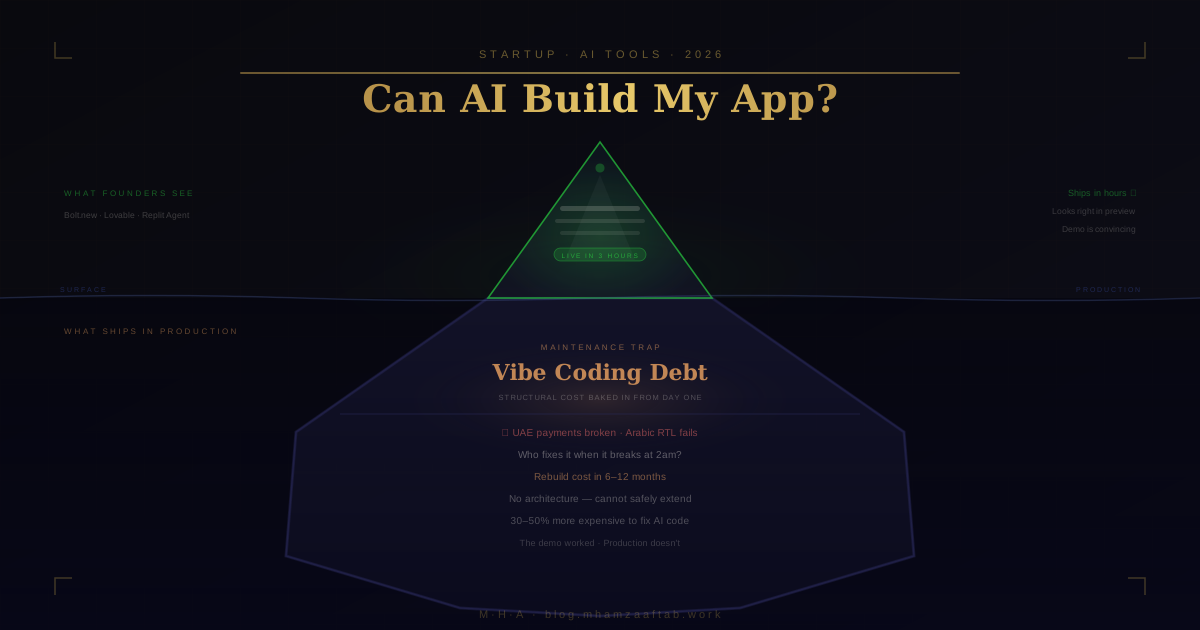
Vibe Coding Debt — Why AI Code Is Hard to Extend
Vibe coding debt is the right name for what accumulates in AI-generated codebases — and it is worth being precise about how it differs from regular technical debt.
Technical debt is cost that accumulates over time as shortcuts compound in a growing codebase. It builds gradually and can be paid down deliberately. Vibe coding debt is different in kind. It is the structural cost baked into AI-generated codebases from day one — before a single real user has touched the product.
AI code generators produce code without consistent architecture, naming conventions, or separation of concerns. There is no mental model of the system guiding the output — just a prompt, and whatever the model made of it. The result is code that can look reasonable at the file level but has no coherent underlying structure as a system. Components depend on each other in ways that were never designed. Logic lives in unexpected places. State flows in directions that made sense in the moment of generation and nowhere else.
The consequence surfaces when you try to extend the product. Adding a new feature to a developer-built codebase is additive: you add the feature, you know where it goes, you know what it touches. Adding a feature to a vibe-coded codebase often causes the AI to partially regenerate sections that were already working — breaking them while building the new thing. Your second feature request is harder than the first. Your third is harder still.
This is the key difference from technical debt: vibe coding debt cannot be paid down incrementally. The underlying architecture was never designed, so there is no architecture to refactor toward. The practical endpoint is a rebuild, and that rebuild typically costs as much as or more than building it correctly from the start would have.
Missing Integrations — Where AI-Generated Apps Quietly Break
AI tools default to the global-market defaults: Stripe for payments, Twilio for SMS, Firebase for real-time data. These work well in markets where all three are widely available and well-documented.
UAE founders hit a specific wall. Stripe's availability in the UAE is limited — most businesses in the region depend on Checkout.com, PayTabs, Tabby for buy-now-pay-later, or Telr. AI tools do not generate accurate integration code for these gateways because they have not seen them in training data at the same depth as Stripe. The demo checkout flow works. The production version, integrated with an actual UAE payment gateway and localised for a UAE customer, does not.
Arabic RTL presents the same pattern. AI tools are trained overwhelmingly on English-first codebases. Generating an application with proper Arabic text handling, right-to-left layout, bidirectional form input, and correct font rendering requires deliberate architectural decisions at the outset — choices the AI does not make because it does not know to make them. The English version looks right. The Arabic version looks broken.
Add UAE VAT at 5%, e-invoicing format requirements, and data residency constraints for certain regulated businesses, and the gap between "AI-generated demo" and "production-ready application for UAE users" is not a cosmetic one. It is architectural.
Who Should Actually Use AI to Build Their App
When AI Is the Right Tool
AI tools are the right starting point when:
- You need a working prototype in 48 hours for a pitch or user testing session — speed matters far more than production reliability
- You are building an internal tool for your own team, where stakes are low and the team can tolerate occasional issues
- You want a landing page with a waitlist form to test whether demand exists before spending any development budget
- Your application logic is genuinely simple: form submits to a database, triggers an email, displays the result
- You have a developer available to review the AI output before it reaches actual customers
If validating your app idea is the goal right now — not launching a production product — AI tools dramatically reduce the time and cost of that validation. The same applies if you are still figuring out what an MVP actually is and what belongs in it before committing to any build approach.
When AI Creates Problems Instead of Solving Them
The situations where AI tools create compounding problems rather than solving them:
- Real customers depending on the system for payments, data integrity, or core workflow — uptime and reliability are not optional
- Any compliance requirement: healthcare, finance, legal, PDPL, UAE-specific data regulation
- The application is your primary business, not a side experiment — you need to extend it without a full rebuild within 12 months
- Arabic language support and RTL design are requirements, not optional enhancements
- You need to scale beyond the initial MVP without budgeting for a complete rebuild
The Hybrid Approach — AI Speed With Developer Quality
The framing "AI or a developer" misrepresents how professional development actually works in 2026.
I use Cursor and Claude on every commercial project I deliver. Scaffolding, boilerplate, utility functions, repetitive patterns, first-pass implementations of standard features — AI tools are fast here, and using them is the responsible choice for keeping project timelines realistic. The business logic, data model, integration architecture, and security decisions are written and reviewed by someone who understands the system being built and why.
What clients get from this approach: roughly 30–40% faster development without the vibe coding debt, because every AI-generated output gets reviewed before it enters the codebase. The code is readable, documented, and extensible — because a developer with a mental model of the system made deliberate choices about structure. This is not "AI-built" or "fully hand-coded." It is professional tooling used correctly.
For the full comparison of Cursor, Copilot, and Claude as development tools — including how they differ and where each one earns its keep — the detailed breakdown is written for developers rather than founders, but the category distinctions are useful context.
A Decision Framework — Which Path Is Right for Your App?
Five questions. Work through them in order — most projects answer themselves before you reach the fifth.
- Will real customers depend on this? Payments, data storage, core workflow — if yes, this requires a developer. AI tools build demos, not production systems.
- Does it involve payments, sensitive data, or UAE/regional compliance? If yes, AI tools can generate a plausible prototype. They cannot generate a compliant production system.
- Do you need Arabic language support or are you targeting a MENA-first audience? If yes, architecture decisions must be made deliberately. They cannot be generated from a prompt.
- Is this a prototype to test an idea before committing development budget? If yes, AI tools are the right starting point. Fast, cheap, good enough for validation.
- Do you have time to debug AI output and are you comfortable it may need a full rebuild within a year? If no, factor that rebuild cost into your AI-route budget before you start.
Yes to any of 1, 2, or 3 means developer-led development. Yes only to 4 means AI tools are the right starting point. Yes to both 4 and 5 means AI tools work — budget for the rebuild. Mixed answers point to the hybrid: developer-led, with AI tooling inside the process.
If your answers point to developer-led development and you want a concrete scope and cost estimate before you commit to anything, get in touch for a free scoping call. I will work through your specific app requirements, tell you which tier it sits in, and give you honest numbers.
A Note on Dubai and the MENA Market
For founders building for UAE, Saudi Arabia, Bahrain, or wider Gulf users — several defaults that AI tools take for granted simply do not apply.
Arabic RTL applications are not a configuration option or a theme setting. Right-to-left layout, Arabic font rendering, bidirectional text handling in form inputs, mirrored navigation elements — these require architectural decisions made at the design stage. AI tools trained on English-first codebases encode left-to-right assumptions throughout their output. Correcting those assumptions after generation means rebuilding core UI components, not adjusting a stylesheet.
UAE payment gateways are a specific gap. Checkout.com, PayTabs, Tabby, and Telr are the operational defaults for businesses in the region. Each has its own SDK, API authentication pattern, and webhook behaviour. AI tools do not generate correct integration code for these gateways because they haven't seen them in training data with the same depth as Stripe. The demo checkout works. The production version, processing real UAE customers through a real local gateway, does not — and the failure is not always obvious until a customer tries to pay.
Data residency is an emerging constraint for regulated businesses in the UAE. Some categories require data to be stored within the country. An AI-generated application with default infrastructure choices will not satisfy this requirement, and there is no prompt that makes the AI aware it should care.
VAT and e-invoicing require custom implementation. UAE VAT at 5% with specific invoice format requirements is a compliance obligation for businesses above the registration threshold. This is not something AI tools handle in their default output.
If you are building for a UAE customer base, a developer with regional experience is not a luxury. It is the difference between a product that meets the actual requirements of the market and one that looks right in the demo and breaks in production. The checklist for hiring a developer in Dubai covers what to look for specifically — including the questions that surface whether a candidate has genuine MENA market experience.
Frequently Asked Questions
Can AI replace app developers?
Not for production applications. AI tools can generate prototypes, internal tools, and simple applications faster than a developer working alone. They cannot make architecture decisions, handle novel integration requirements, ensure regulatory compliance, or maintain what they have built when it breaks in production. The developer's role has changed — AI tools are standard inside professional development workflows now — but the developer has not been replaced by them.
Is vibe coding good enough for a real startup?
For validation and prototyping, yes. For production — meaning real customers, real money, real uptime requirements — the structural problems in AI-generated code (vibe coding debt) typically surface within 6–12 months. The rebuild cost is usually comparable to — or higher than — what building it correctly would have cost in the first place. Use AI tools to validate, then build the production version with deliberate architecture.
How much does it cost to build an app with AI tools?
Tool subscriptions run $0–$65 per month. The real cost is founder time: 40–80 hours at $50–$100 per hour equivalent is $2,000–$8,000 in opportunity cost for a basic application. Add hosting at $20–$200 per month, plus developer cost when things break. For a customer-facing application over twelve months, the AI-first route often costs more in total than engaging a developer from the start — and produces something harder to extend.
What is the biggest risk of building your app with AI?
The maintenance and extension problem. AI-generated codebases are difficult to debug, expensive for a developer to take over, and hard to extend without re-generating and potentially breaking what was already working. The risk is not that the initial app fails — it often works adequately in the demo. The risk is being stranded when you need to fix something, add a feature, or scale. At that point you are rebuilding from scratch, and the time spent on the AI-generated version does not transfer.
Should I use Bolt.new or hire a developer for my startup?
Use Bolt.new for a prototype you need to test whether an idea has demand — it is fast, cheap, and right for that job. Hire a developer for a customer-facing application with payments, real users, and any requirement that needs to work reliably in production. The mistake is using Bolt.new for the second use case because the demo looked right. The demo always looks right. Production is where the distinction matters.
The question is not AI or a developer — it is whether the person building your app understands how to use both correctly.
The smart approach: AI speed, developer quality. I use Cursor and Claude on every commercial project I deliver. Clients get faster development without the vibe coding debt, because AI-generated output gets reviewed before it enters the codebase. The code ships cleaner, extends without breaking things, and does not require a full rebuild six months after launch.
If you have an app idea and want an honest assessment of what it will actually take to build — which path makes sense, what it costs, and what the risks are — get in touch for a free scoping call. I will give you a straight answer, not a pitch.
For a detailed breakdown of what development actually costs across different app types before you decide, the MVP development cost guide covers every tier with real numbers.